

Most traders assume that upgrading to a premium indicator is like hiring a smarter analyst. Pay more, get better signals, win more trades. That assumption costs real money. In fast-moving crypto and forex scalping markets, even the most sophisticated TradingView tool is only as useful as the process behind it. This guide breaks down exactly what premium indicators are, how their core features actually work, where they give you a genuine edge, where they fall short, and how to vet any indicator before trusting it with live capital. No hype. Just what you need to know.
Table of Contents
- What are premium indicators? Core features explained
- Premium/discount zones: How they work in smart money frameworks
- Non-repainting logic: The linchpin for scalper automation
- Backtesting, robustness, and what most traders miss
- What most premium indicator explainer guides miss
- Advance your scalping with automation-ready premium indicators
- Frequently asked questions
Key Takeaways
| Point | Details |
|---|---|
| Premium features | Paid indicators offer advanced capabilities like composites, alerts, and automation but require careful integration. |
| Zone filters | Premium/discount zones provide context—not signals—and need additional triggers for effective scalping. |
| Avoid repainting risk | Non-repainting logic is critical for automation; always test indicators live for stability before trusting execution. |
| Backtest limits | Relying on historical backtests alone is risky; check for robustness, forward performance, and real execution fit. |
| Real edge | Sustainable scalping success relies on process, not just powerful indicators—discipline and workflow matter most. |
What are premium indicators? Core features explained
The term "premium indicator" gets thrown around loosely. On TradingView, premium indicators are paid Pine Script suites or scripts that layer advanced functionality on top of standard charting logic. We're talking composite signal generation, multi-timeframe analytics, automated alert routing, and signal tables designed for fast execution. That's fundamentally different from a free RSI or MACD script.
Here's what typically separates premium from free tools:
- Multi-timeframe confluence: Free scripts read one timeframe. Premium suites read several simultaneously, filtering lower-timeframe entries against higher-timeframe structure.
- Automation hooks: Native webhook support, alert templates, and Discord integration let signals fire directly to execution environments without manual monitoring.
- Composite scoring: Instead of a single signal line, premium tools often score across trend, momentum, and volatility modules and produce a weighted output.
- Non-repainting logic: A serious commitment in coding. Most free scripts repaint. Quality premium scripts are engineered from the ground up to avoid it.
- Signal tables and dashboards: Real-time tables that aggregate conditions across multiple assets or timeframes in one panel.
Many paid suite indicators for scalpers combine confluence modules covering trend, momentum, and market structure, plus automation hooks like webhook alerts and signal tables that support real-time execution. That's meaningfully different from stacking three separate free indicators yourself.
Here's a quick comparison of what you get at each level:
| Feature | Free scripts | Single premium indicator | Premium suite |
|---|---|---|---|
| Multi-timeframe logic | Rarely | Sometimes | Standard |
| Composite scoring | No | Limited | Full |
| Webhook/alert automation | No | Sometimes | Standard |
| Non-repainting guarantee | Rare | Depends | Typical |
| Signal table/dashboard | No | No | Yes |
| Backtesting integration | Basic | Moderate | Advanced |
| Divergence detection | Manual | Sometimes | Built-in |
Understanding this matrix matters before you spend anything. A premium Pine Script indicator earns its price when the feature set directly addresses a gap in your process, not just because it looks more complex. Always map the feature list to your actual workflow before buying.
"The question isn't whether a premium indicator has more features. The question is whether those features address the exact bottlenecks in your specific scalping process."
When evaluating any scalping indicator in Pine Script, focus specifically on whether automation hooks support your execution environment and whether confluence modules reduce false entries on your target timeframes.
Premium/discount zones: How they work in smart money frameworks
Now that you understand what premium indicators and suites offer, let's look closer at one of the most discussed advanced tools: premium/discount zones, and how they're actually used in smart money strategies.
Premium/discount zones in Smart Money Concepts (SMC) and ICT-style frameworks define a fair-value midpoint from a measured price range. The upper half of that range is "premium" (price is expensive relative to recent range midpoint). The lower half is "discount" (price is cheap). The midpoint, the 50% equilibrium line, is the dividing threshold.

Here's why this matters for scalpers. The framework gives you structural context before you execute. Buying in a deep discount zone with bullish structure confirmation is a higher-quality entry than buying mid-range with no directional bias. That context filters out a lot of low-quality setups.
Classic SMC vs. standard overbought/oversold comparison:
| Criteria | Premium/discount (SMC) | Standard RSI overbought/oversold |
|---|---|---|
| Basis | Price range midpoint (structural) | Momentum oscillator |
| Signal type | Context filter | Direct signal |
| Requires confluence | Always | Sometimes |
| Timeframe sensitivity | High | Moderate |
| Usable for automation | Yes, with triggers | Yes, standalone |
| False signal rate | Lower (when filtered) | Higher (in trending markets) |
One specific zone gets a lot of attention: the OTE zone (Optimal Trade Entry), which sits between 62% and 79% of a measured retracement. In ICT methodology, this is considered the sweet spot where institutional-grade entries cluster. Price returning into this zone during a confirmed trend offers a statistically tighter risk-to-reward setup than generic zone entries.
How to combine premium/discount context with a real trigger:
- Identify the most recent swing high and swing low on your execution timeframe.
- Mark the 50% midpoint. Price above it is premium; below it is discount.
- Determine directional bias from a higher timeframe (trend direction, order block alignment).
- Wait for price to enter the opposing zone: buying in discount during an uptrend, selling in premium during a downtrend.
- Look for a second trigger, such as a bullish order block, a Fair Value Gap (FVG) fill, or a market structure shift.
- Only execute when both zone context and trigger align. Never trade zone entry alone.
Pro Tip: If price is spending significant time in premium during an uptrend, it signals strength, not a sell. Context always overrides the zone label. Use order block/structure breakout tools to confirm the actual trigger rather than relying solely on the zone boundaries.
The biggest mistake traders make with premium/discount zones is treating them as buy/sell signals on their own. They are filters. Without a confluence trigger, zone entries become high-risk fades against potentially strong momentum.
Non-repainting logic: The linchpin for scalper automation
With structural context in place, a deeper risk emerges for automated scalpers: how reliable are your indicator signals, really? Enter the threat of repainting.
Repainting occurs when a script changes its historical plots after the chart reloads or recalculates. What looked like a perfect signal bar three candles ago suddenly disappears or shifts. For manual traders, it's annoying. For automation, it's catastrophic. Your alert fires based on a signal that no longer exists by the time you check performance.
TradingView repainting is a critical risk for scalpers using automated signals: scripts can change historical plots when recalculated, especially when they rely on real-time data differences or lookahead bias.
Scripts and indicator types most prone to repainting:
- Security() calls without barmerge.lookahead_off: Multi-timeframe requests that pull future data into current bar calculations.
- Strategies using calc_on_every_tick=true: Recalculate mid-bar and may fire signals that don't persist to bar close.
- Real-time buffer functions: ta.highest() or ta.lowest() with dynamic lookback can shift as new bars form.
- Neural or adaptive indicators: Parameters that self-optimize based on recent history can silently shift past signals.
- Poorly coded reversal detectors: If the reversal logic references future bar confirmation without explicit bar-close anchoring, signals move.
Pro Tip: Before trusting any indicator with automation, run it in a replay or demo session. Mark several signal bars manually. Reload the chart the next day and compare. If past signals moved or vanished, the script repaints. No exceptions. Disqualify it for automation use immediately.
"Non-repainting is the baseline requirement for any signal you intend to route through webhooks or execute algorithmically. If you can't trust the signal on a historical bar, you can't trust the alert on a live bar."
A premium reversal indicator built with proper Pine Script v6 conventions explicitly anchors signals to confirmed bar closes and disables lookahead in all multi-timeframe calls. That's what separates a tool designed for real automation from one designed to look impressive on a screenshot.
Non-repainting alone still doesn't make a strategy robust. It simply clears the first hurdle.
Backtesting, robustness, and what most traders miss
Avoiding repainting is necessary, but it's not a guarantee of real-world performance. Many scalpers still stumble here, often with false confidence from impressive backtest equity curves.
TradingView's built-in backtester has known limitations that can make any strategy look better than it actually performs live. The primary issue is intra-bar execution ambiguity: the backtester only sees OHLC data per bar, meaning it doesn't know in what order the high and low occurred within that bar. A strategy that signals short at the high and then exits at the low of the same bar looks like a clean win in the backtest. In live trading, that sequence may have been reversed.
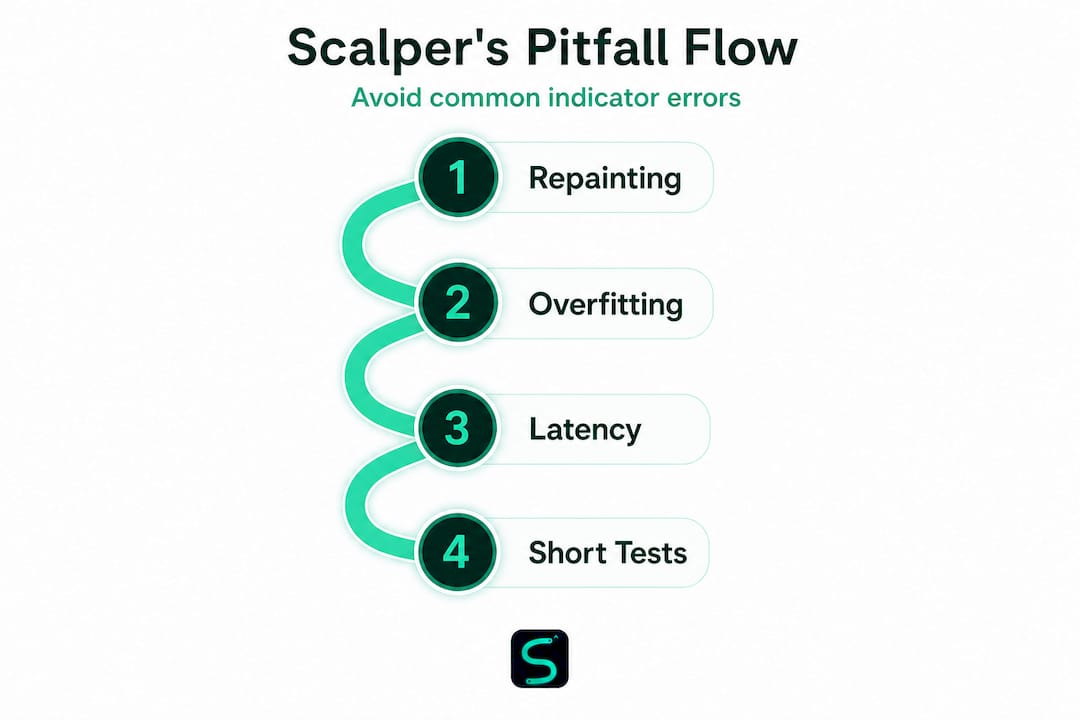
Even non-repainting scripts can produce misleading backtest results due to TradingView backtester limitations around intra-bar trigger order, unrealistic execution assumptions, and parameter overfitting to historical data.
Critical backtest reliability criteria to check:
- Signal persistence: Does the signal appear and stay on bar close, or does it appear mid-bar and potentially vanish?
- Forward testing: Run the indicator on a paper trading account for at least 2 to 4 weeks before drawing conclusions.
- Cross-asset robustness: A quality indicator should produce consistent logic across multiple assets and timeframes, not just the one it was optimized on.
- Slippage and spread modeling: Add realistic spread to your backtests. On 1-minute crypto bars, spread impact is significant and rarely accounted for in default settings.
- Sample size: 50 trades in backtest is statistically insufficient. Aim for 200 or more signals before assessing performance.
- Parameter sensitivity: Tweak input variables slightly. If small changes cause wildly different results, the strategy is overfit.
A checklist for validating any premium indicator selection before going live:
- Confirm non-repainting with manual reload test.
- Run forward test in demo for minimum 3 weeks.
- Check performance across at least 3 different assets in your target class.
- Verify results hold across adjacent timeframes (e.g., 3m and 5m if targeting 5m).
- Model realistic execution costs in backtests.
- Review open-source code if available to understand signal construction.
When using scalping indicators effectively, the validation process should take at least 4 to 6 weeks before any live capital deployment. Patience here is not caution. It's execution quality.
What most premium indicator explainer guides miss
Here's the perspective that separates occasional winners from consistently profitable scalpers: the real edge from premium indicators is not in the features list. It's in knowing when not to use them.
Every indicator has market conditions where it performs well and conditions where it falls apart. A momentum-based signal engine thrives in trending, liquid sessions. That same engine fires low-quality signals during news-driven chop, low-spread Asian sessions, or periods of compressed volatility. Most explainer guides don't tell you this because they're trying to sell you on the tool, not prepare you for the moments you should turn it off.
The mature scalping workflow looks like this. You don't just activate automation and walk away. You define operating conditions: minimum average true range, session hours, spread thresholds, and liquidity filters. Your automated smart scalping signals should only be active when those conditions are met. Outside of those windows, manual discretion or no trade at all is the better call.
The FOMO trap is real. A new indicator fires a strong signal and you override your rules because "it looks so clean." That override is where edge gets destroyed. The indicator didn't fail. Your process did. Persistence in following your validation framework, even when signals look compelling, is the actual discipline premium tools require.
Forward testing before live deployment, phased automation rollout (starting with alerts only, then semi-automated, then fully automated), and clear documentation of what triggers a regime change in your approach: these operational details matter more than any single feature in a paid indicator's marketing copy.
Advance your scalping with automation-ready premium indicators
If this guide clarified what you actually need from a premium indicator, the next step is finding tools built to those standards. Not every paid script on TradingView is engineered with non-repainting signals, proper backtesting transparency, and automation-ready webhook infrastructure.
At Scalping-Algo, the focus is on exactly that: premium TradingView scalping indicators built in Pine Script v6, verified non-repainting, with native webhook alerts, open-source code, and a Discord community for live mentorship. The Algo Master indicator suite integrates trend, momentum, and structure modules with real-time confluence scoring across crypto, forex, and futures. Whether you're validating your first automated setup or scaling up an existing system, the platform provides the tools and the education to do it right.
Frequently asked questions
Do premium indicators on TradingView guarantee higher profits?
No indicator guarantees profits. Premium indicators offer advanced features and automation capability, but real-world performance depends on your validation process, risk management, and how well the tool fits your specific market conditions.
How can you tell if an indicator is repainting?
Test in live or demo mode, mark signal positions manually, then reload the chart after a session. If past signal locations changed, the script repaints and should not be used for automated execution.
What are the biggest risks of relying on premium indicators for scalping?
The top three risks are repainting signals, backtest overfitting, and execution latency in fast markets. Misleading backtest results from TradingView's intra-bar limitations alone can produce false confidence before a strategy is forward-tested.
Do premium/discount zones automatically signal buy or sell?
No. Premium/discount zones are structural context filters, not direct buy or sell signals. They require a second confluence trigger, such as an order block, FVG, or market structure shift, before any execution decision is valid.