

Most traders have been there. You set a price level, walk away from your charts, and come back to find the move already happened without you. The problem isn't discipline. It's infrastructure. Learning to explain webhook trading alerts is the first step toward building a system that actually acts on signals while you're away. This article breaks down what webhook alerts are, how they work under the hood, what makes them secure, and how to deploy them in real trading workflows without getting burned by common mistakes.
Table of Contents
- Key takeaways
- Explaining webhook trading alerts and how they work
- Setting up webhook alerts for automated trading
- Security: protecting your webhook endpoint
- Reliability and operational best practices
- Advanced use cases: from alert to executed order
- My honest take on webhook automation
- Take your webhook alerts further with Scalping-Algo
- FAQ
Key takeaways
| Point | Details |
|---|---|
| Webhooks fire instantly | An HTTP POST hits your server the moment a condition triggers, with zero polling delay. |
| Payloads carry trade data | JSON messages include action, symbol, quantity, stop loss, and take profit for direct broker execution. |
| Security is non-negotiable | HMAC-SHA256 verification and timestamp checks prevent forged and replayed trade signals. |
| Reliability needs monitoring | Webhook delivery is best-effort, so observability layers catch silent failures before they cost you money. |
| VPS hosting is standard | A 24/7 live endpoint on a VPS receives TradingView alerts even when your local machine is off. |
Explaining webhook trading alerts and how they work
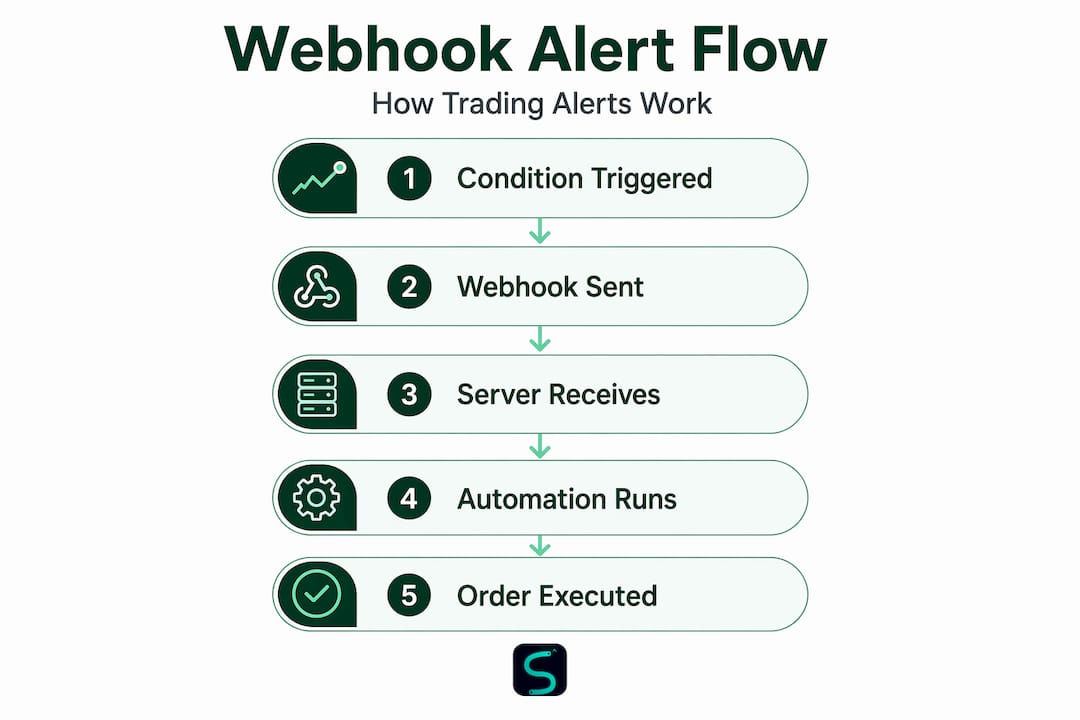
A webhook alert is an automated HTTP POST request sent from a trading platform to an external server the instant a predefined condition is met. No polling. No waiting. The moment your indicator fires, the request goes out.
Compare that to traditional alert methods. Email and SMS notifications are fine for informing a human, but they're not machines. By the time you read a text and click into your broker, the entry is gone. Webhook trading notifications are designed to talk directly to software, which means the chain from signal to order can be fully automated.
Here's what actually happens technically. When your alert condition triggers on a platform like TradingView, TradingView's servers construct an HTTP POST request and send it to your specified webhook URL. That URL points to your server or middleware application, which receives the payload, parses the data, and executes the trade logic.
The payload itself is typically a JSON object. Common fields include:
- action: ""buy"
or"sell"` - ticker: the symbol being traded
- close: the price at alert time
- quantity: position size
- stop_loss and take_profit: risk parameters
TradingView supports dynamic placeholders like {{ticker}}, {{close}}, {{time}}, {{volume}}, and {{interval}} directly inside alert message templates. These get substituted with live market values at the moment the alert fires, so your webhook message always carries current, context-specific data.
Pro Tip: Use {{timenow}} alongside {{time}} in your payload to capture both the bar time and the exact moment the alert fired. This helps with latency debugging and duplicate detection later.
This event-driven model is what makes webhook alerts fundamentally different from polling-based systems. Polling hammers an API repeatedly on a timer, burning through rate limits. Webhooks wait silently and deliver exactly when something happens.

Setting up webhook alerts for automated trading
Getting your first webhook alert live on TradingView takes about five minutes once you know what goes where. Here's the core process:
- Open TradingView and navigate to the Alerts panel (clock icon on the right sidebar).
- Click Add Alert and configure your trigger condition (indicator cross, price level, Pine Script condition, etc.).
- In the Notifications tab, check the Webhook URL box.
- Paste the full URL of your receiving endpoint (your server, automation platform, or trading bot URL).
- In the Message field, write your JSON payload using dynamic placeholders.
A real webhook message for a scalping setup might look like this:
{
  "action": "buy",
  "symbol": "{{ticker}}",
  "price": {{close}},
  "qty": 0.1,
  "sl": {{plot("Stop Loss")}},
  "tp": {{plot("Take Profit")}},
  "time": "{{timenow}}"
}
Once TradingView fires this at your endpoint, an automation platform or trading bot parses the JSON and translates it into a live broker order.
Common integration scenarios include:
- Automation platforms: Services like Capitalise.ai, PineConnector, or 3Commas receive webhook payloads and route orders to connected brokers.
- Custom servers: Python or Node.js scripts on a VPS listen for incoming POST requests and call broker APIs directly.
- Discord bots: Webhook alerts can post trade signals to a Discord channel as part of a community alert workflow.
Before going live, always test your endpoint with a tool like Webhook.site or Postman. Send a sample payload manually and verify your server handles it correctly. Silent parsing errors in production translate directly into missed or malformed trades. Check your alert setup basics before trusting any automation with real capital.
Security: protecting your webhook endpoint
This is where most traders drop the ball completely. The majority of webhook implementations skip security checks entirely, leaving endpoints wide open to anyone who discovers the URL. That's not a theoretical risk. A forged request that mimics a buy signal could open an unwanted position at any time.
The standard defense is HMAC-SHA256 signature verification. Here's how it works: the webhook provider (say, TradingView or your middleware) signs the raw request body with a shared secret key using the HMAC-SHA256 algorithm. Your receiving server recomputes the same hash and compares it to the signature in the request header. If they don't match, you reject the request outright.
A few critical details most guides skip:
- Hash raw bytes, not parsed JSON. Computing the hash after parsing and re-stringifying the JSON body will break the signature match because whitespace and key ordering can shift. Always hash the raw request body before any parsing happens.
- Use timing-safe comparison. Standard string equality checks are vulnerable to timing attacks. Use constant-time comparison functions from your language's crypto library.
- Validate timestamps. Every request should include a timestamp. Reject any request where the timestamp is more than 5 minutes old. The industry-standard tolerance window is 5 minutes to account for normal server clock drift.
- Enforce idempotency. Store processed event IDs with a 48-hour TTL and reject any payload carrying a duplicate ID. This prevents the same signal from firing two trades if the provider retries delivery.
Warning: Skipping signature verification is described by security experts as an open invitation for attackers to forge or replay webhook signals directly into your trade execution pipeline. One forged signal can open, close, or size a position without any chart condition being met.
Pro Tip: Store your HMAC secret in an environment variable, never hardcoded in your script. Rotate the secret immediately if your endpoint URL becomes public or is exposed in logs.
Webhook security is not optional when real money is on the line. Treat your webhook endpoint with the same seriousness as your broker login credentials.
Reliability and operational best practices
Here's something that surprises traders who are new to webhook automation: webhook delivery is best-effort. Providers make a reasonable attempt to deliver, but if your endpoint is down, slow, or returns an error, the signal may be lost. There's no built-in guarantee.
That has concrete implications. If TradingView fires a sell signal during a drawdown and your server is unreachable at that moment, the trade doesn't execute. You might not find out until you check your positions manually hours later.
Fixing this requires an observability layer on top of your webhook system. Practically, that means:
- Uptime monitoring: Use a service like Better Uptime or UptimeRobot to ping your endpoint every minute and alert you if it goes down.
- Request logging: Log every incoming webhook request with its timestamp, payload hash, and response status. This creates a paper trail for debugging.
- Failure escalation: Progressive alerting on failed deliveries should escalate from informational to urgent based on consecutive failure count.
- Retry handling: If your middleware provider retries failed deliveries, your idempotency logic (event ID deduplication) protects you from double executions.
On the infrastructure side, TradingView fires alerts from its own servers, not your local machine. Your charts don't even need to be open. But your receiving endpoint does need to be up around the clock. A VPS hosting your listener is the standard solution. Even a low-cost virtual server handles hundreds of webhook requests per second with minimal latency.
Pro Tip: Run your webhook listener process inside a process manager like PM2 (Node.js) or Supervisor (Python). These tools auto-restart your server if it crashes, keeping your endpoint live without manual intervention.
Latency matters too. If your server takes 10 seconds to respond, TradingView may time out and mark the delivery as failed. Aim for sub-second response times. Acknowledge the receipt immediately with a 200 status, then process the trade logic asynchronously if needed.
Advanced use cases: from alert to executed order
Once your webhook pipeline is secure and reliable, the real possibilities open up. The most direct use case is connecting TradingView alerts to live broker execution through an automation platform.
Here's a practical workflow example:
- A Pine Script indicator on TradingView detects a scalping entry condition on the 5-minute chart.
- TradingView fires a webhook POST to your PineConnector or Capitalise.ai endpoint.
- The platform parses the action, symbol, and risk parameters from the JSON payload.
- A broker order is placed via the platform's connected API within milliseconds.
- A confirmation message posts to your Discord trading alerts channel for logging and review.
This workflow runs without any manual input. You can run multiple strategies across different symbols simultaneously, each with its own alert and webhook chain.
| Automation platform | Best suited for | Broker access |
|---|---|---|
| PineConnector | Forex and futures via MT4/MT5 | MetaTrader brokers |
| Capitalise.ai | Crypto and equities, no-code setup | Multiple exchanges |
| Custom Python server | Full control, any broker API | Any with REST/WebSocket API |
For Discord integration, webhook alerts can be configured to post formatted trade notifications to specific channels in your server. Scalping-Algo's indicators support native webhook delivery to Discord directly from TradingView alerts, which means your community or personal trade log stays updated in real time.
Scalability is another advantage. Running 10 strategies requires 10 alert configurations, each pointing to the same endpoint with different payload parameters. The server differentiates by strategy ID or symbol in the JSON. No extra infrastructure needed.
My honest take on webhook automation
I've watched traders rush to connect webhooks to live accounts after an hour of reading, skip the security setup because it felt like extra work, and then wonder why a phantom position appeared in their broker account. What they experienced wasn't a glitch. It was a forged request to an unprotected endpoint.
In my experience, the security step is the one traders most consistently underestimate. It feels abstract until something goes wrong. By then, the position is open and the loss is real.
The other thing I'd push back on is the assumption that webhooks are "set and forget." They're not. Observability is half the job. A webhook system with no logging, no uptime alerts, and no failure escalation is one server hiccup away from a missed trade or an unmonitored open position. The traders I've seen run clean automation all have a monitoring layer that tells them when something breaks before the market punishes them for it.
That said, the productivity upside is real. When you get the security and reliability pieces right, webhook alerts transform how you operate. You stop watching charts during news events. You scale strategies without scaling your attention. You sleep through volatile sessions knowing your system is working.
Choose your automation partner carefully. Test everything in paper trading first. Verify your security implementation before connecting real funds. The technology is solid. The execution discipline around it is what separates traders who benefit from it and traders who get burned.
— Tran
Take your webhook alerts further with Scalping-Algo
If you're building a webhook-powered trading setup and want premium signals worth automating, Scalping-Algo's TradingView indicators are built for exactly this workflow.
The Smart Scalping Signals indicator generates real-time, non-repainting buy and sell signals on lower timeframes with built-in alert compatibility, so connecting to a webhook endpoint is a natural next step. For traders who want a full system, the Algo Master suite combines three indicators with a command center dashboard, backtesting tools, and Discord community support. Every script is open-source and built in Pine Script v6. Explore the full indicator library at Scalping-Algo and test any tool in a paper account before you automate with real capital.
FAQ
What is a webhook trading alert?
A webhook trading alert is an automated HTTP POST request sent from a trading platform to an external server the moment a trade condition is met. It enables real-time, hands-free trade execution without any manual chart monitoring.
How do webhook alerts differ from email or SMS alerts?
Email and SMS alerts notify a human. Webhook alerts notify a machine. The payload delivers structured JSON data that automation software can immediately parse and translate into a broker order, with no human step required.
What security measures protect a webhook endpoint?
HMAC-SHA256 signature verification, timestamp validation with a 5-minute tolerance window, and idempotency key storage with a 48-hour TTL are the three core defenses against forged and replayed webhook signals.
Do I need a VPS to receive TradingView webhook alerts?
Yes. Since TradingView fires alerts from its own servers, your receiving endpoint must be online 24/7. A VPS is the standard solution because it stays live even when your local machine is off.
Can webhook alerts trigger trades automatically without manual input?
Yes. When combined with an automation platform or custom server, webhook alerts can route directly to broker APIs and place orders in milliseconds, with no human in the loop between signal and execution.