
Median TradingView webhook latency runs about 4.0 seconds from candle close to server receipt, with tail cases stretching past 9 seconds during busy sessions. That's fine for swing and most intraday setups, but it's a real constraint for scalping strategies built on 1 minute closes. The delay chain, not any single weak link, is what usually eats the clock. Measure your own setup before you assume it's broken.
TL;DR:
- TradingView alert latency typically averages around 4 seconds from candle close to server receipt, with tail cases exceeding 9 seconds during busy US sessions.
- Most delays stem from alert evaluation on TradingView's servers and network transit to your webhook, rather than the broker execution or script design.
- Switching to Once Per Bar instead of Once Per Bar Close, and using regional webhook endpoints, can significantly reduce average latency.
- Measuring latency accurately involves including timestamps in alerts, syncing clocks with NTP, and collecting sufficient samples to analyze percentiles.
- Scalping strategies require sub 2 second median delay and tight tail control, while longer-term traders can tolerate delays of up to 10 seconds or more.
Table of Contents
- What Causes Alert Latency in TradingView Webhooks?
- Why Do TradingView Alerts Seem Delayed?
- How Do You Measure Real-Time Alert Latency?
- Where Do Most Delays Actually Come From?
- How Can You Reduce TradingView Alert Latency?
- Do Latency Thresholds Change by Trading Style?
- How Scalping-Algo Handles Latency in Practice
- Speed Without Recklessness: A Perspective on Latency Fixes
- Get Faster, Safer Alert Execution With Scalping-Algo
- Sources
- FAQ
What Causes Alert Latency in TradingView Webhooks?
Every alert travels through four handoffs, and each one adds its own slice of time. Knowing which stage owns the delay tells you whether to fix your Pine script, your webhook relay, or your broker connection instead of guessing at all three.
Stage 1: Alert evaluation on TradingView's servers. When a bar closes, TradingView's backend has to evaluate your condition against real-time price feeds before it queues the alert for firing. This step alone accounts for a meaningful chunk of the delay, especially on Once Per Bar Close settings, because the server waits for the first trade of the new bar to confirm the close price. If there are no trades right at the open, or the first trade prints late, that wait can stretch to a full minute on thinly traded symbols.
Stage 2: Webhook delivery and network transit. Once the alert fires, TradingView pushes a payload to your webhook URL. This trip covers DNS resolution, SSL handshake, and physical distance between TradingView's servers and yours. A webhook endpoint hosted on the wrong continent adds real milliseconds, sometimes seconds, purely from geography.
Stage 3: Automation platform processing. Whatever receives the webhook, whether that's a relay service, a custom server, or a bot, has to parse the JSON, validate the signal, and translate it into an order instruction. Poorly optimized middleware or a server under load can bottleneck here just as easily as TradingView's own queue.
Stage 4: Broker API execution. The final leg is your broker accepting and filling the order. Broker API response time varies wildly by provider and by how busy their systems are during peak hours.
Who controls what:
- TradingView owns evaluation and queuing (stage 1) — you influence it through script settings, not raw speed.
- You own the network path and relay code (stages 2 and 3) — this is where most fixable latency lives.
- Your broker owns execution speed (stage 4) — your leverage here is choosing a faster broker or connection method.
Why Do TradingView Alerts Seem Delayed?
Most "TradingView is slow" complaints trace back to a misunderstanding of how alerts actually fire, not a genuine platform failure. Four behaviors cause the bulk of perceived delay.
Once Per Bar vs. Once Per Bar Close. Once Per Bar fires the instant your condition is true, mid-candle. Once Per Bar Close waits for the candle to fully close and the next bar's first trade to confirm it, which TradingView's own support documentation confirms can add several seconds of legitimate, expected delay. If you're chasing speed, Once Per Bar Close is often the wrong setting for a scalp entry.
Repainting and calc_on_every_tick. Scripts that recalculate on every tick behave differently on live bars versus historical ones, and TradingView's Pine Script FAQ notes this can produce alert timing that looks inconsistent even when the underlying logic is sound. A signal that repaints on the chart can also fire an alert at a moment that doesn't match what you see visually after the fact.
Plot offsets creating false delay reports. Indicators built for divergence or pivot detection frequently shift plotted labels backward to earlier bars for visual clarity. The alert itself still triggers on the live bar; TradingView support confirms offsets don't change the actual trigger point. Traders see a label two bars back and assume the alert fired late when it didn't.
Rate limits during high-volatility windows. Firing too many alerts too fast can trigger frequency throttling, which stacks delay on top of whatever the network already adds.
- Add
{{timenow}}to every alert message to see the exact moment TradingView believes it fired. - Set Once Per Bar instead of Once Per Bar Close when speed matters more than confirmed-close accuracy.
- Check your indicator's offset settings before assuming an alert misfired.
Pro Tip: Run the same alert condition on Once Per Bar and Once Per Bar Close side by side for a week, logging {{timenow}} on both. The gap between them is the real cost of waiting for bar confirmation on your specific instrument.
How Do You Measure Real-Time Alert Latency?
You can't fix what you haven't measured, and eyeballing a delay from memory is close to useless. Here's a repeatable method.
- Insert
{{timenow}}into your alert JSON payload. This placeholder captures the exact server time TradingView believes the alert fired, giving you a fixed reference point. - Log the server receipt timestamp the instant your webhook endpoint receives the payload. Whatever platform sits behind your webhook (a relay, a bot, a Discord integration) should timestamp on arrival, not after processing.
- Sync your clocks with NTP first. Comparing
{{timenow}}against a receipt timestamp is meaningless if your server clock drifts. Network Time Protocol standards exist specifically to keep distributed systems on the same clock, and skipping this step is the single most common measurement mistake traders make. - Collect at least 100 to 200 samples across different sessions. One or two data points tell you nothing about typical behavior. Measurement guidance from TradersPost shows most webhook signals arrive near 1 second, but occasional outliers stretch far longer, so sample size matters.
- Report median, 95th, and 99th percentiles, not just an average. A single mean hides the tail risk that actually burns scalpers. Split your measurement into two legs:
{{timenow}}to receipt (TradingView's share) and receipt to broker fill (your automation's share) to isolate the real bottleneck.
Where Do Most Delays Actually Come From?
Not every source of delay is fixable, and knowing which ones you control saves hours of chasing dead ends.
- TradingView server queuing. Largely outside your control, though switching to Once Per Bar reduces the wait built into bar-close confirmation.
- Thin liquidity on your instrument. Symbols with sparse trading volume delay the first-trade confirmation Once Per Bar Close depends on. Fix: trade more liquid pairs or contracts, or switch alert timing.
- Network and webhook transit issues. DNS misconfiguration, unnecessary redirects, or a webhook endpoint hosted far from TradingView's servers all add avoidable milliseconds. Fix: use a direct, regionally sensible endpoint.
- Automation platform queuing. A relay service under heavy load or a broker API with slow response times can dominate total latency. Fix: choose infrastructure built for speed, or simplify your processing chain.
- Rate limits and alert frequency halts. Firing alerts too aggressively on volatile symbols can trigger throttling that adds delay right when you need speed most. Fix: consolidate conditions into fewer, higher-quality alerts.
Community reports on forums and Reddit threads discussing webhook delays describe intermittent slowdowns ranging from seconds to full minutes during incidents. That variability is exactly why designing for the tail matters more than optimizing for the median alone.
How Can You Reduce TradingView Alert Latency?
Fixes fall into three effort tiers. Start cheap, then escalate only if measurements show you need to.
- Quick fixes (minutes to implement). Add
{{timenow}}to every alert so you can measure going forward. Switch to Once Per Bar where confirmed-close accuracy isn't essential. Strip unnecessary calculations out of your Pine script; a leaner script evaluates faster. - Mid-level fixes (an afternoon of setup). Use a regional webhook endpoint close to TradingView's infrastructure. Keep persistent connections open where your platform supports it instead of reconnecting per alert. Eliminate unnecessary redirects in your webhook URL chain, since each hop adds a round trip.
- Higher-effort fixes (infrastructure investment). Route through a managed low-latency relay rather than a general-purpose webhook tool. Consider colocated servers near your broker's data center if you're executing at real scale. Compare brokers on documented API response time, since execution speed varies widely by provider, and some support direct webhook ingestion that skips a middleman entirely.
Fail-safes matter just as much as raw speed; for a detailed explanation of how to automate TradingView alerts into live broker orders, see TradingView Strategy Automation: How to Go From Alert to Live Order. Add volatility gating so a delayed signal doesn't fire into a market that's already moved past your entry logic. Build a confirmation step that checks price hasn't drifted beyond an acceptable band before an order goes live. Log every fired alert against its execution outcome so you catch misfires early instead of discovering them after a losing week.
Pro Tip: Before rolling any latency fix into live trading, run it in parallel with your existing setup for at least a few dozen signals. A change that shaves 200 milliseconds but introduces even one false-positive execution isn't a net win.
Do Latency Thresholds Change by Trading Style?
They do, and treating every strategy against the same latency bar is a common mistake.
- Scalpers (1 to 5 minute timeframes) need sub 2 second median latency and tight 95th percentile control, since a 9 second tail delay can mean the entire move is over before the order lands.
- Intraday traders (15 minute to 1 hour timeframes) have more room, typically tolerating 5 to 10 second delays without materially hurting entries.
- Swing traders (4 hour and daily timeframes) can absorb delays measured in minutes without any practical impact on outcomes.
The median alone doesn't tell the full story. A 4 second median with a 9.9 second 95th percentile means one in twenty alerts runs dramatically slower than "typical," and session timing compounds the problem: US-session delays run roughly 27% slower than off-peak hours. If your measured 95th percentile exceeds your strategy's tolerance, either widen your entry logic to absorb the slop or move to a lower-frequency timeframe where the gap stops mattering.
How Scalping-Algo Handles Latency in Practice
Instrumenting latency shouldn't require building your own logging system from scratch. Scalping-Algo's Command Center timestamps every fired alert against server receipt automatically, so you see your real delay distribution without wiring up separate tools.
- Alert JSON payloads include
{{timenow}}and other metadata as standard fields, giving you data needed for before-and-after latency comparisons. - Volatility gating and confirmation windows sit built into the indicator logic, so a delayed signal that arrives into a moved market gets filtered rather than blindly executed.
- Non-repainting signal design means the alert you log matches the signal you'll see on replay, with no offset confusion about when it actually triggered.
Every configuration change gets validated the same way: measure your baseline, apply the change, measure again, and compare percentiles rather than trusting a gut feeling that something "feels faster." For deeper detail on structuring alert payloads, see this alert message syntax guide.
Speed Without Recklessness: A Perspective on Latency Fixes
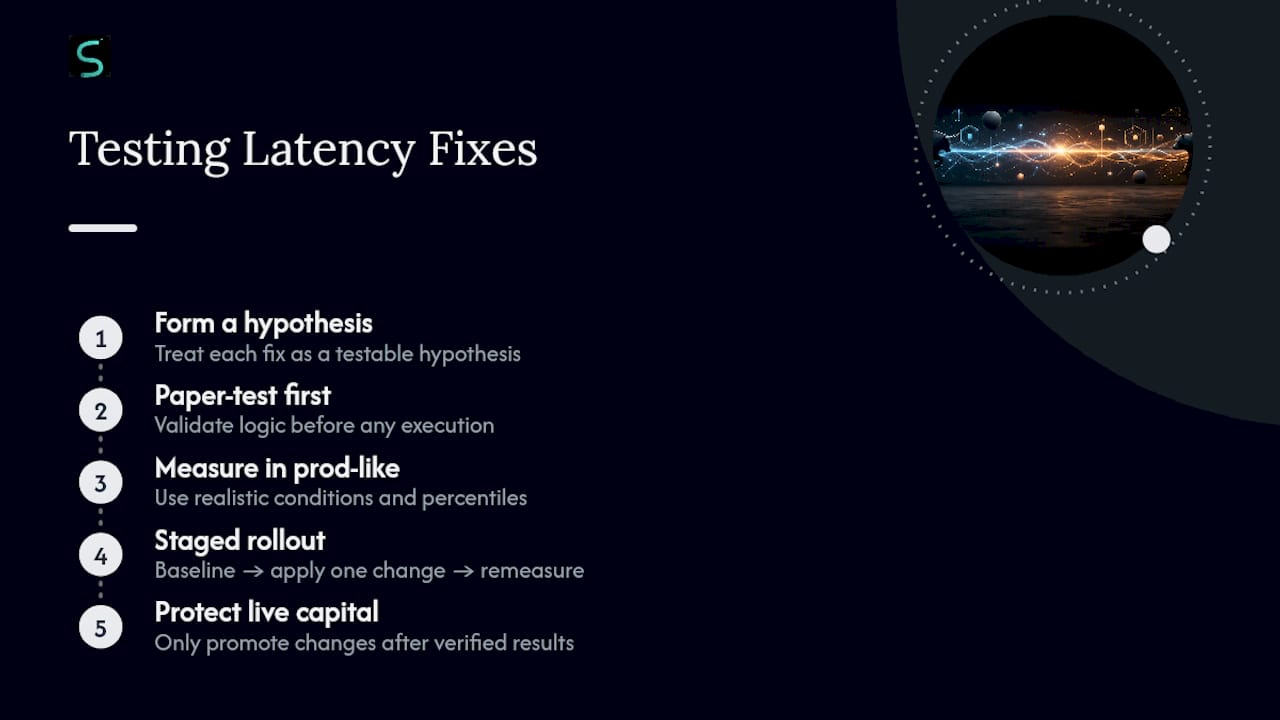
Shaving latency is easy to overdo. Push too hard for speed and you trade false positives for milliseconds, firing on noise instead of confirmed moves. The traders who get this right treat every latency fix as a hypothesis to test, not a settings change to trust blindly. Paper-test first, measure in production-like conditions second, and only then let a change touch live capital.
A staged rollout beats a leap of faith every time: baseline your current percentiles, apply one change, remeasure before stacking a second change on top. Skip that discipline and you won't know which fix actually helped, or which one quietly introduced a new failure mode. Speed that isn't measured isn't speed. It's a guess with better marketing.
— Tran
Get Faster, Safer Alert Execution With Scalping-Algo
Most traders chasing lower latency end up stitching together a Pine script, a third-party webhook relay, and a separate logging spreadsheet, hoping the pieces stay in sync. Scalping-Algo skips that patchwork: its indicator suite runs on open-source Pine Script v6, fires native webhook alerts with {{timenow}} and signal metadata built in, and logs every fired alert against server receipt inside the Command Center automatically.
That means the measurement workflow covered above, add a timestamp field, log receipt, compare percentiles, isn't something you build yourself. It's already running behind every signal. Non-repainting entries, volatility gating, and multi-timeframe confluence tools work alongside that logging so a faster alert doesn't come at the cost of a safer one. If you're running scalping strategies on 1 to 15 minute charts and want your latency fixes backed by real data instead of guesswork, check out the full indicator suite or explore the Algo Master bundle to see how the alert infrastructure fits your setup.
Sources
- Delays in OncePerBarClose alerts — TradingView
- TradingView Webhook Delay: 34,174 Alerts on Real Latency
- How to Measure TradingView Latency in TradersPost
- Network Time Protocol (NTP)
FAQ
Are TradingView Alerts Delayed?
Yes, to some degree. Median delay from candle close to server receipt runs about 4.0 seconds, with slower tails during high-volume US sessions.
Does TradingView Have Latency Issues?
TradingView's alert evaluation and queuing add measurable latency by design, particularly on Once Per Bar Close settings that wait for the next bar's first trade before firing.
How Do You Fix Delay on TradingView?
Switch to Once Per Bar where confirmed-close accuracy isn't critical, simplify your Pine script, add {{timenow}} to measure your actual latency, and use a regional webhook endpoint or a relay like Scalping-Algo's Command Center that logs timing automatically.
Is There a 15 Minute Delay on TradingView?
No, that's a misconception, likely tied to free-plan data feed restrictions rather than alert delivery. Alert webhook latency itself measures in seconds, not minutes, under normal conditions.
What's a Good Latency Target for Scalping?
Aim for sub 2 second median latency with tight 95th percentile control on 1 to 5 minute timeframes, since tail delays beyond that window can mean your entry price has already moved.