

The top TradingView indicators for scalping are SuperTrend, VWAP, EMA ribbon (8/21 or 9/20), RSI (short-period or adaptive), Bollinger Bands/Keltner Channels with ATR gating, and a volume/OBV delta filter. Stack them in three layers — trend filter, momentum timing, volatility/volume gate — and you have a setup that works on 1m and 5m charts across crypto, forex, and equities.
Here's the shortlist with quick tags:
- SuperTrend (ATR 10/3 or 7/2) — best trend filter for 1m/5m; doubles as a trailing stop
- EMA ribbon (9/20 or 8/21) — fast trend direction and momentum shifts; ideal for 5m crypto and forex
- VWAP (session-anchored) — intraday location reference; essential for equities and futures
- RSI (7 or 9 period) — momentum timing and divergence on 1m; pair with a trend filter
- Bollinger Bands / Keltner squeeze — volatility gate; signals on squeeze release
- Volume/OBV delta — confirmation layer; filters low-conviction moves
TL;DR: Built-in TradingView tools work, but configuring them correctly for 1m/5m takes time and testing. If you want a ready-to-run setup with non-repainting signals, webhook alerts, and a backtesting dashboard already built in, Scalping-algo's Algo Master suite is the fastest path from setup to live execution.
Table of Contents
- What makes a good scalping indicator on 1m–15m charts?
- Which indicator types work best for scalping on TradingView?
- Three practical 1m and 5m scalping stacks you can build today
- How to add, tune, and save these indicators on TradingView
- How to backtest scalping setups and build webhook alerts on TradingView
- Common scalping mistakes and how to avoid them
- Why Scalping-algo's Algo Master is the recommended turnkey solution
- Key Takeaways
- The discipline gap most scalpers never close
- What you get with Scalping-algo's Algo Master suite
- Useful sources and further reading
What makes a good scalping indicator on 1m–15m charts?
Grouping indicators by role — trend filter, momentum timing, volatility gate, location reference, exit tool — is the foundation of any reliable scalping setup. Chasing a single "best" indicator is the wrong frame. The right question is: does each tool in your stack have a defined job?
Here's the four-point test to apply to any TradingView script before you trade it live:
- Low lag / non-repainting. Signals must confirm on candle close and never shift after the fact. Repainting indicators can show a near-perfect backtest win rate that collapses in live execution.
- Discrete signals or clear rule-based thresholds. Arrows, crosses, or color flips beat continuous oscillator lines for fast decision-making on 1m charts. You need a binary trigger, not a judgment call.
- Volatility gating with realistic stop/target guidance. ATR-based stops adapt to current market conditions; fixed-point stops do not. Any indicator worth using on a 1m chart should either include ATR-based exits or pair cleanly with one.
- Multi-timeframe or session context. A 1m signal without a 5m or 15m trend filter is noise. VWAP adds session-level location awareness; a higher-timeframe EMA adds directional bias.
Quick checklist for evaluating any TradingView script:
- Does the script description explicitly state "non-repainting, confirmed on bar close"?
- Can you see the signal logic in Pine Script (open-source or visible inputs)?
- Does it include ATR-based or volatility-aware stop guidance?
- Does it have a role — trend, momentum, volatility, or location — or is it trying to do everything?
- Does it support TradingView alerts for live execution?
Pro Tip: To verify non-repainting in real time, watch the indicator on a live 1-minute chart during the first 30 minutes of the NYSE open (9:30–10:00 AM ET). A true non-repainting signal will not move or disappear after the candle closes. If arrows shift position on the next candle, the script is repainting.
Understanding what a trade signal actually represents — and why confirmation matters — is the step most beginners skip.
Which indicator types work best for scalping on TradingView?
No single indicator wins across all conditions. What works is assigning each tool a specific role inside a tested rule set. Here's the taxonomy that matters for short-timeframe trading.
SuperTrend
SuperTrend is the most practical trend filter for 1m–5m charts. It plots a dynamic trailing stop line that flips direction on trend change, giving you both a bias signal and an exit level in one tool. Prop traders commonly use ATR period 10, factor 3 on 5m charts and ATR period 7, factor 2 on 1m charts to reduce lag. Works across crypto, forex, and futures. Repainting risk: low on confirmed-close versions; always verify the script description.

EMA / EMA ribbon
Short EMAs — particularly the 9/20 or 8/21 combination — are a standard trend filter for scalpers because they smooth noise without the delay of longer-period averages. A ribbon (multiple EMAs plotted together) shows trend strength by how spread or compressed the lines are. Best on 5m and 15m for forex and crypto. On 1m, they can lag slightly during fast reversals, so pair with a momentum trigger.
VWAP (session-anchored)
VWAP shows where price stands relative to the session's volume-weighted average — the level institutional participants use as a reference. Price above VWAP signals bullish session bias; below signals bearish. Use session-anchored VWAP (resets daily) for equities and futures. For crypto running 24/7, anchor to a fixed session window (e.g., 9:30 AM–4:00 PM ET) to maintain relevance.
RSI (short-period or adaptive)
RSI at period 7 or 9 responds fast enough for 1m scalping. Use it for momentum timing — enter longs when RSI crosses back above 30 in an uptrend, shorts when it crosses below 70 in a downtrend. Adaptive RSI variants adjust the lookback period based on volatility, reducing false signals during choppy sessions. Divergence between RSI and price is one of the more reliable reversal signals on 5m charts.
Bollinger Bands / Keltner Channels / ATR gate
Bollinger Bands and Keltner Channels work as volatility gates. When Bollinger Bands contract inside Keltner Channels — the classic "squeeze" — energy is building. Signals taken on squeeze release tend to follow through more cleanly than signals taken during random chop. ATR alone can gate entries: only take signals when ATR is above a minimum threshold, filtering out dead-market noise.
Volume / OBV / delta approximations
Volume confirms whether a move has participation behind it. On-Balance Volume (OBV) trends up during accumulation and down during distribution. Delta approximations (buying volume minus selling volume) are more granular but require a broker feed or specialized script. For most scalpers, a simple volume spike filter — only trade when current bar volume exceeds the 20-bar average — adds meaningful signal quality.
Order blocks / FVG / price-action tools
Order blocks and Fair Value Gaps (FVGs) mark price levels where institutional activity likely occurred. Pairing these with macro market structure prevents counter-trend entries without context. Best used as location filters on 5m and 15m, not as standalone entry triggers on 1m.
Role-based mapping:
| Role | Indicator | Best Timeframe | Asset Classes |
|---|---|---|---|
| Trend filter | SuperTrend, EMA ribbon | 1m, 5m, 15m | All |
| Momentum timing | RSI (7–9), adaptive RSI | 1m, 5m | Crypto, forex |
| Volatility gate | Bollinger/Keltner squeeze, ATR | 1m, 5m | All |
| Location reference | VWAP, order blocks | 5m, 15m | Equities, futures |
| Exit / risk tool | ATR trailing stop, SuperTrend | 1m, 5m | All |
Three practical 1m and 5m scalping stacks you can build today
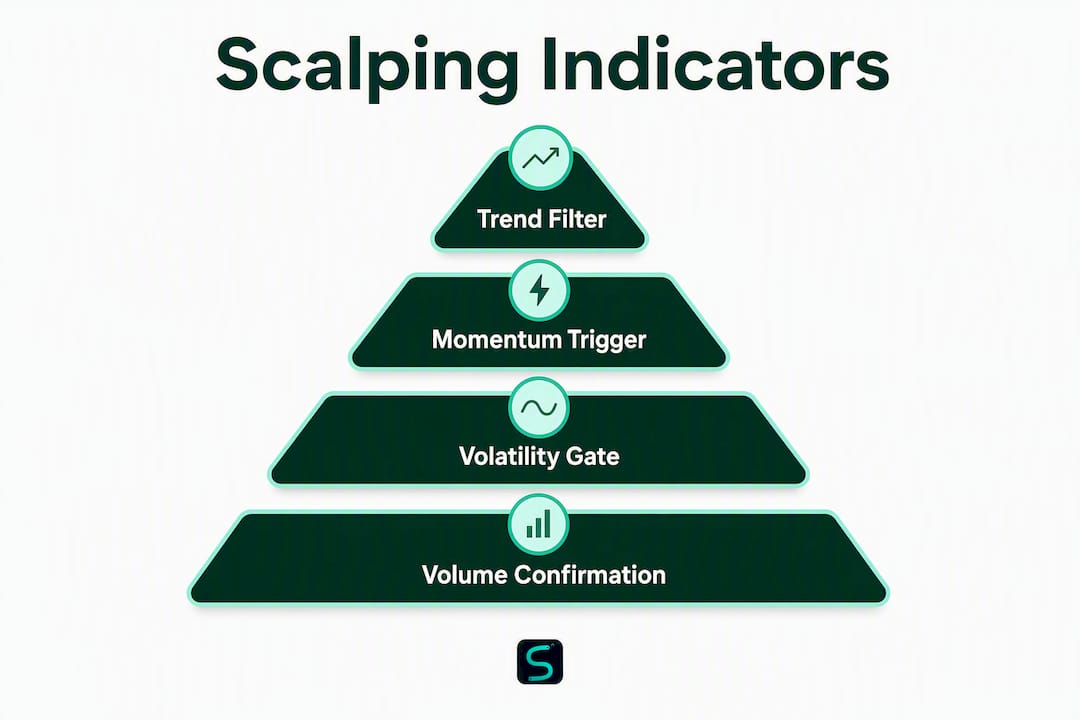
Each stack below follows the same architecture: trend filter + momentum trigger + volatility/volume gate. That three-layer structure is what separates high-probability entries from noise. For a deeper look at building confluence systems step by step, the methodology applies directly to these setups.
Stack A: SuperTrend + EMA ribbon + Volume delta
Best for: 5m crypto and futures; trending sessions
- Trend filter: SuperTrend (ATR 10, factor 3) on 5m. Only take longs when price is above the SuperTrend line; shorts when below.
- Momentum trigger: EMA ribbon (9/20). Enter on a ribbon crossover in the direction of SuperTrend.
- Volume gate: Current bar volume must exceed the 20-bar average. No volume spike, no trade.
- Stop-loss: 1.5× ATR(14) below entry for longs; above for shorts.
- Exit plan: Take 50% off at 1R, move stop to breakeven, trail the remainder with SuperTrend.
Sample 1m settings: SuperTrend ATR 7, factor 2; EMA 8/21; volume gate at 1.2× 20-bar average.
Stack B: VWAP + RSI(7) + Bollinger/ATR gate
Best for: 1m equities and forex during high-liquidity sessions (9:30–11:00 AM ET)
- Location reference: Price must be above session VWAP for longs; below for shorts.
- Momentum trigger: RSI(7) crosses above 30 (long) or below 70 (short) after a pullback.
- Volatility gate: Bollinger Bands (20, 2.0) must not be in a squeeze state. ATR(14) must be above its 10-bar average.
- Stop-loss: 1.0× ATR(14) from entry.
- Exit plan: 50% at 1R, trail remainder with a 0.5× ATR step.
Stack C: EMA ribbon + Adaptive RSI + ATR trailing exit
Best for: 5m forex and crypto; works in both trending and ranging conditions
- Trend filter: EMA ribbon (9/20/50). All three EMAs must be aligned (stacked) in the trade direction.
- Momentum trigger: Adaptive RSI crosses the midline (50) in the direction of the trend.
- Exit tool: ATR trailing stop (ATR 14, multiplier 2.0) activates after entry; no fixed TP.
- Stop-loss: 1.5× ATR(14) from entry.
- Position sizing: Risk 0.5%–1% of account per trade. Position size = (Account × Risk%) / (ATR × multiplier).
Pro Tip: Set a signal cooldown of at least 3–5 bars between entries on 1m charts. Back-to-back signals during choppy conditions are the fastest way to churn through your daily loss limit. Most Pine Script indicators support a barssince() guard to enforce this automatically.
Multi-layer confluence systems that require several independent signals to align — such as the AlphaX Pulse Scalper's 4-layer engine, which fires only when at least 3 of 4 conditions agree — consistently reduce false signals compared to single-indicator setups. The principle applies directly to all three stacks above: the more independent layers that agree, the higher the signal quality.
How to add, tune, and save these indicators on TradingView
Getting the settings right matters as much as choosing the right tools. Here's how to set up any of the three stacks above without wasting time on configuration errors.
- Add built-in indicators. Click the "Indicators" button (top toolbar), search by name (e.g., "SuperTrend," "VWAP," "Bollinger Bands"), and select the built-in version. Built-ins are non-repainting and maintained by TradingView.
- Add community scripts. Search in the same panel, then filter by "Community Scripts." Read the script description carefully — look for "non-repainting" and "confirmed on bar close" before adding.
- Adjust inputs. Click the gear icon on any indicator label to open settings. Change period, factor, or source values to match the parameters in the table below.
- Set session VWAP. In VWAP settings, set "Anchor Period" to "Session" for equities and futures. For crypto, anchor to a custom time window matching your trading session.
- Save a template. Right-click the chart, select "Save chart layout as template," and name it (e.g., "Stack A 5m Crypto"). Load it instantly on any chart.
Recommended default parameters:
| Indicator | 1m Setting | 5m Setting | Notes |
|---|---|---|---|
| SuperTrend | ATR 7, factor 2 | ATR 10, factor 3 | Lower factor = more signals, more noise |
| EMA ribbon | 8, 21 | 9, 20, 50 | Add 50 EMA for 5m trend alignment |
| RSI | Period 7 | Period 9 | Use 30/70 levels; adaptive variant for choppy markets |
| Bollinger Bands | 20, 2.0 | 20, 2.0 | Pair with Keltner (20, 1.5) for squeeze detection |
| ATR | Period 14 | Period 14 | Use for stop sizing and volatility gating |
| VWAP | Session anchor | Session anchor | Reset daily; use fixed window for 24/7 crypto |
For 1m charts specifically, limit the number of plotted objects. More than four overlapping indicators on a 1m chart creates visual noise that slows decisions. Use a condensed dashboard or a multi-timeframe scalping dashboard to keep higher-timeframe context visible without cluttering the price chart.
A note on Pine Script versions: Scripts written in Pine Script v5 or v6 support native alert() functions with message placeholders, which are required for webhook execution. If a community script runs on v3 or v4, it may not support webhook payloads correctly. Check the script header for // @version=5 or // @version=6 before building an alert workflow around it.
How to backtest scalping setups and build webhook alerts on TradingView
Validating a setup before risking capital is non-negotiable. Here's the practical workflow.
Backtesting checklist for 1m/5m scalping strategies:
- Minimum sample size: Run at least 100 completed trades in the strategy tester. Fewer than that and the win rate is statistically meaningless.
- Session filters: Apply a session filter in Pine Script (
timefunction) to restrict backtests to your actual trading hours. A strategy that looks great at 2:00 AM ET may fail during the NYSE open. - Slippage and commission modeling: In TradingView strategy settings, set slippage to at least 1–2 ticks and commission to match your broker's actual rate. Ignoring these inflates backtest results significantly on 1m charts.
- Walk-forward basics: Split your data into in-sample (optimization) and out-of-sample (validation) periods. A common split is 70/30. If performance collapses on the out-of-sample window, the setup is overfit.
- Convert to a strategy: To backtest indicator rules, wrap them in a
strategy()block in Pine Script. Non-programmers can use TradingView's built-in "Strategy Tester" with a Pine Script strategy version of any indicator.
Setting up webhook alerts:
- Right-click any indicator signal on the chart and select "Add Alert."
- In the alert dialog, set "Condition" to the indicator's signal output.
- In the "Notifications" tab, enable "Webhook URL" and paste your endpoint (Discord webhook, broker API, or automation service).
- In the "Message" field, use placeholders:
{{ticker}},{{close}},{{time}}for dynamic payloads. - Set "Alert Frequency" to "Once Per Bar Close" — this prevents intra-bar triggers that would fire on repainting signals.
The MTF scalping dashboard approach routes alerts from multiple timeframes into a single view, which simplifies the monitoring step considerably.
Pro Tip: Always run new alert configurations in paper/demo mode for at least two full trading sessions before connecting to a live broker. Include a timestamp check in your webhook handler — if the signal arrives more than 5 seconds after bar close, treat it as stale and skip execution. Latency is a real cost on 1m charts.
Common scalping mistakes and how to avoid them
Most scalping losses trace back to a short list of repeatable errors. Here's what to watch for and the specific controls that fix each one.
Common mistakes:
- Too many indicators. Stacking six or more disconnected tools creates conflicting signals and analysis paralysis. Fewer high-conviction signals validated by confluence work better than a crowded chart.
- Ignoring spread and commission. On a 1m chart, a 2-pip spread on a 5-pip target is a 40% cost before the trade even moves. Always calculate net expectancy after spread and commission.
- Trading low-liquidity instruments on 1m. Thin markets produce erratic price action that breaks every indicator. Stick to instruments with consistent volume during your session.
- Emotional scaling-in. Adding to a losing position because "it has to come back" is how small losses become account-damaging ones.
- Ignoring session volatility. The first and last 15 minutes of a session are often erratic. Many professional scalpers avoid the first two minutes of the NYSE open entirely.
Concrete risk controls:
- ATR-based stop sizing: Use ATR-based stops rather than fixed-point stops. A 1.0–1.5× ATR(14) stop adapts to current volatility automatically.
- Max risk per trade: Cap each trade at 0.5%–1% of account equity. Position size = (Account × Risk%) / Stop distance in dollars.
- Daily loss limit: Set a hard daily loss limit of 2%–3% of account. When hit, stop trading for the day. No exceptions.
- Signal cooldown: Enforce a minimum of 3–5 bars between signals to prevent over-trading during choppy conditions.
- Minimum volume filter: Only trade when current bar volume exceeds the session average. This filters out low-participation moves that indicators flag but price doesn't follow through on.
For practical guidance on precision scalping execution, the combination of ATR stops and daily loss limits is the single most effective risk framework for 1m traders.
Why Scalping-algo's Algo Master is the recommended turnkey solution
Building a three-layer stack from scratch takes time: sourcing non-repainting scripts, configuring parameters, wiring webhook alerts, and building a backtesting workflow. Scalping-algo's Algo Master suite packages all of that into a ready-to-run system.
What's included:
- Non-repainting buy/sell signals confirmed on bar close, optimized for 1m–15m charts
- Volatility gating built into the signal engine — no separate ATR filter to configure
- Order block and FVG detection for institutional-level location context
- Multi-timeframe confluence that checks higher-timeframe bias before firing a signal
- ATR-based projected TP/SL levels plotted directly on the chart
- Native webhook alerts for Discord and broker API routing, ready out of the box
- Backtesting dashboard with strategy-tester integration for rapid setup validation
- Discord mentorship community with live trading sessions and educational resources
All scripts are open-source Pine Script v6, which means you can inspect the logic, verify non-repainting behavior, and confirm webhook compatibility before subscribing. The smart scalping signals product page details the full signal architecture.
Onboarding steps:
- Subscribe to a monthly, yearly, or lifetime plan at scalping-algo.com.
- Add the Algo Master scripts to your TradingView chart via the shared script link provided after subscription.
- Join the Discord community for onboarding walkthrough and live session access.
- Run sample backtests on your preferred asset and timeframe using the built-in dashboard.
- Test webhook alerts in paper mode for two sessions before going live.
Algo Master works across crypto, forex, indices, commodities, options, and equities. Active scalpers trading multiple sessions will get the most from a yearly or lifetime plan, which includes full suite access and priority Discord support.
Key Takeaways
The most effective scalping setup on TradingView combines a non-repainting trend filter, a fast momentum trigger, and a volatility gate — all confirmed on bar close and validated through at least 100 backtested trades before live execution.
| Point | Details |
|---|---|
| Three-layer stack | Combine trend filter + momentum timing + volatility gate for reliable 1m–5m signals. |
| Non-repainting first | Verify signals confirm on bar close; repainting indicators inflate backtest win rates and fail live. |
| ATR-based risk sizing | Use 1.0–1.5× ATR(14) for stops and take 50% off at 1R, then trail the remainder. |
| Backtest before live | Run a minimum of 100 trades in TradingView's strategy tester with slippage and commission modeled. |
| Scalping-algo Algo Master | Delivers a pre-built, non-repainting three-indicator suite with webhook alerts and a backtesting dashboard for immediate deployment. |
The discipline gap most scalpers never close
Scalping is the most execution-dependent style of trading. The indicators are the easy part. What separates traders who last from those who don't is almost never the tool — it's the discipline to follow the rules when the market is moving fast and the temptation to override the system is highest.
The three-layer confluence approach works precisely because it forces you to wait. When trend, momentum, and volatility all agree, the probability of follow-through is meaningfully higher than when you act on a single signal in isolation. That waiting is uncomfortable. It means fewer trades, which feels wrong when you're watching a chart tick by tick. But fewer, higher-quality entries is the actual edge.
Forward testing matters more than most traders realize. Running a setup on paper for two weeks before sizing up tells you how the system behaves in real conditions — not just in the clean historical data the strategy tester uses. Start small, track every trade, and only scale position size after the live results match the backtest expectation within a reasonable range.
Community and mentorship accelerate this process. Experienced traders who teach context-aware indicator use — pairing order blocks and FVG detection with macro structure — compress the learning curve significantly. The tools are only as good as the framework around them.
What you get with Scalping-algo's Algo Master suite
Most traders spend weeks configuring indicators, chasing non-repainting scripts, and manually wiring alerts. Scalping-algo cuts that setup time down to a single session.
The Algo Master suite gives you three pre-built, Pine Script v6 indicators with non-repainting signals, volatility gating, order block detection, and ATR-based TP/SL — all ready to load on TradingView in minutes. Webhook alerts route directly to Discord or your broker API. The backtesting dashboard is built in. And the Discord community means you're not figuring out live execution alone.
What you get on day one:
- Full Algo Master indicator suite (non-repainting, 1m–15m optimized)
- Native webhook alerts for Discord and broker routing
- Backtesting dashboard with strategy-tester integration
- Access to the educational academy and live trading sessions
- Discord mentorship community with onboarding support
Getting started takes three steps: subscribe at scalping-algo.com, add the scripts to TradingView using the link in your confirmation, and join the Discord for a guided onboarding walkthrough. Run your first demo backtest the same day.
Useful sources and further reading
- ProScalper by day_trade_mind — TradingView — Multi-confluence 1-minute scalping system with grade-based signal quality, ATR stops, and partial exit levels; useful reference for understanding complete signal architecture.
- QTP Precision Scalp Indicator — TradingView — Five-layer confluence engine with ZLEMA, WaveTrend, squeeze gate, and efficiency ratio; strong reference for multi-layer filter design.
- AlphaX Pulse Scalper — TradingView — Demonstrates 4-layer confluence scoring and Bollinger/Keltner squeeze detection for volatility gating.
- SuperTrend Pro Topstep Scalping Edition — TradingView — ATR-tuned SuperTrend for 1m/5m prop trading; covers stop sizing and partial exit methodology.
- Elaris Fast Scalp Pro — TradingView — Non-repainting signal design reference; useful for understanding bar-close confirmation standards.
- SCALP PRO v2 — TradingView — Advanced multi-timeframe scalping indicator covering order block integration and mentorship-driven context.
- Best Scalping Indicators — Kotak Neo — Overview of common scalping indicators including EMA, RSI, MACD, and VWAP with role-based guidance.
- Forex Scalping Indicators — FXGlory — Role-based indicator mapping and VWAP session bias explanation for forex scalpers.
- Best TradingView Indicator for Scalping — Scalping-algo — Scalping-algo's own overview of recommended indicators and configurations for TradingView.
- 1-Minute Scalping Indicator for TradingView — Scalping-algo — Specific 1m configurations, parameter examples, and setup guidance from the Scalping-algo team.
- Why Use Trading Scanners — Morning Options — Covers the value of filtering and scanning tools for traders selecting indicators and setups.