

The short answer: a compact, non-repainting TradingView indicator suite combining a trend filter, momentum timing tool, and volume/volatility gate — automated to webhooks for execution — is the most reliable automated buy/sell setup available to retail traders today. Investopedia confirms that 2–4 complementary indicators, not a stacked chart, produce the clearest edge. Scalping-algo is the ready-tested implementation we recommend for scalpers who want that setup without building it from scratch.
Your minimum viable automated toolkit:
- Non-repainting buy/sell signals (verified in TradingView replay mode)
- Market-regime filter (trend detection that disables signals in choppy conditions)
- Multi-timeframe confluence (higher-timeframe bias confirming lower-timeframe entry)
- Volatility gate (ATR or VWAP-based threshold that pauses signals in low-quality conditions)
- Webhook alerts (structured payloads routed to Discord or a broker API)
TradingView is the practical platform for building and running this setup. Its Pine Script environment, native alert system, and webhook support make it the standard for retail automation in the U.S. market. Scalping-algo's suite, built in Pine Script v6, covers every item on that checklist out of the box.
Table of Contents
- What do automated buy and sell indicators actually measure?
- How do buy/sell scripts fit into your trading workflow?
- Which indicator categories should you automate?
- How do you set up automated alerts from TradingView to execution?
- How do you validate automated indicators before risking capital?
- Why does transparency matter, and how does Scalping-algo meet the standard?
- What pitfalls and red flags should you watch for?
- Key Takeaways
- The case for fewer, better signals
- Scalping-algo gives you the tested toolkit, not just the theory
- Useful sources and further reading
What do automated buy and sell indicators actually measure?
Buy/sell indicators, or signal indicators as practitioners often call them, are not prediction engines. They are confirmation tools that measure specific market conditions and fire alerts when those conditions align. Understanding what each layer measures tells you how much to trust any given signal.
The five primary measurement roles:
- Trend identification: Determines the dominant direction (MA crossovers, ADX, Ichimoku Cloud). This is the bias layer — it answers "which way should I be trading?"
- Momentum timing: Measures the speed and strength of a move (RSI, MACD, Stochastic). This answers "is this move strong enough to enter right now?"
- Volume confirmation: Confirms whether institutional participation backs the move (Volume Profile, OBV, VWAP). Volume Profile showed the highest reliability for identifying major support/resistance zones in backtested analysis.
- Volatility and stops: Quantifies how far price typically moves so you can set rational stops (ATR, Bollinger Bands). ATR doesn't predict direction — it tells you how much room the trade needs.
- Reversal structure: Detects institutional footprints like order blocks and fair value gaps (Smart Money Concepts). These zones offer higher-probability reversal signals for scalpers.
Automated indicators are better at timing entries and confirming structure than at predicting direction. That distinction matters in practice: a signal that fires in the right direction but at the wrong moment in a trend still loses. Practical outputs from a well-configured automated system include entry/exit triggers, suggested TP/SL levels, signal quality scores, and webhook payloads ready for routing.
Pro Tip: Prefer indicators that output a signal-quality tier (e.g., A/B/C grade or a numeric score) rather than a binary buy/sell. Regime gating plus quality scoring cuts false signals far more effectively than adding a fourth indicator.

How do buy/sell scripts fit into your trading workflow?

Indicators are timing tools. Establish your bias first — everything else follows from that rule.
Here is a five-step workflow you can drop directly into your routine:
- Establish market bias. Check the higher timeframe (daily or 4H for intraday traders, 15m for scalpers) using a trend filter. Only take long signals when bias is bullish, short signals when bearish. Regime-adaptive gating that auto-disables signals in choppy conditions materially reduces drawdowns in live automation.
- Require confluence across indicator tiers. A trend signal alone is not enough. Require momentum confirmation and volume validation before accepting an entry. Two confirming layers is the minimum; three is the standard.
- Use signals for timing, not direction. The automated signal tells you when to enter a move you already identified. Never let a signal override your bias read.
- Define risk before accepting the signal. Set your position size and stop-loss level before the alert fires. ATR-based stops are the standard: size the stop to 1.5x ATR from entry so normal volatility doesn't shake you out.
- Execute and monitor with alerts and fail-safes. Route the signal through your webhook to Discord or your broker API. Keep a daily loss cap active. Check fill quality on the first 10–20 live trades before scaling size.
What happens automatically vs. manually:
- Regime detection, signal quality scoring, and TP/SL projection: automated
- Final execution decision (especially early in live testing): manual or semi-automated
- Daily loss cap enforcement: should be automated at the broker or middleware level
Pre-trade checklist:
- Higher-timeframe bias confirmed?
- Signal quality score meets your threshold?
- ATR-based stop calculated and within your risk budget?
- Daily loss limit not yet hit?
Pro Tip: Build an automated "safety ladder" into your webhook handler: volatility gate first, then signal-quality threshold, then a max daily trade cap. This three-layer filter prevents overtrading during regime shifts — the single most common cause of live-account blowups.
Which indicator categories should you automate?
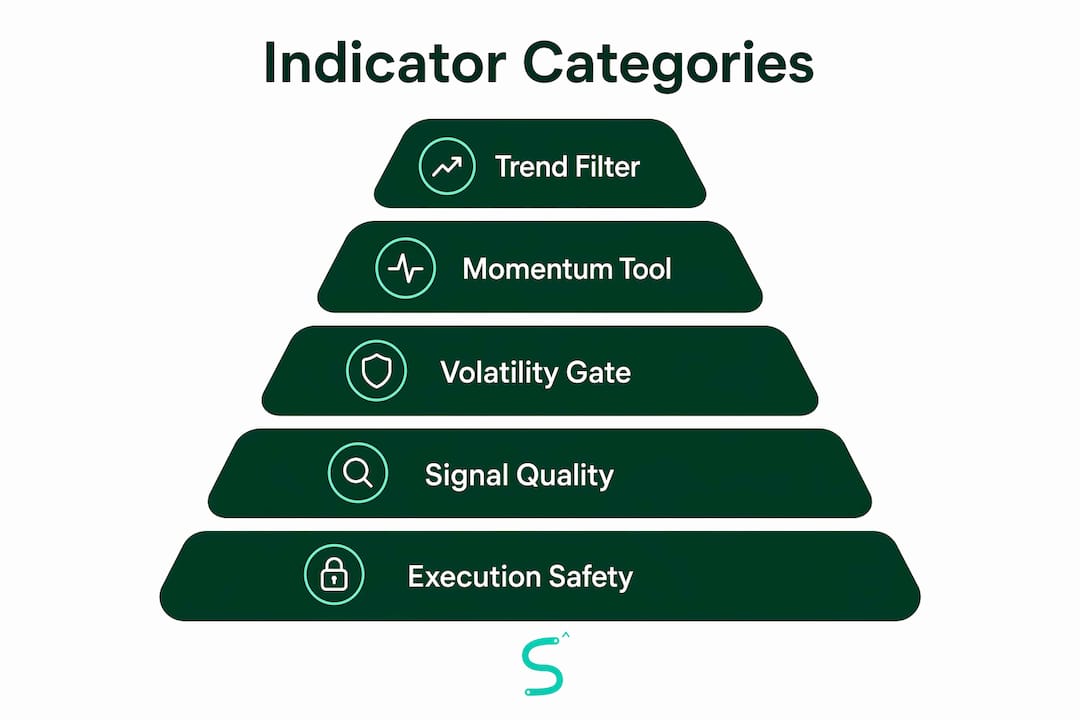
One trend filter + one momentum timing tool + one volume/volatility confirmation. That's the full toolkit. Fewer, complementary indicators beat a crowded chart every time, and a three-pillar framework of trend, momentum, and volume produced better risk-adjusted results across backtested analysis of standard tools.
Recommended categories
- Trend filters (MA, ADX, Ichimoku): The 9/21 EMA pair works well for scalping; the 50/200 EMA for intraday and swing. ADX above 25 confirms a trending regime worth trading. Ichimoku replaces three or four separate indicators for traders who want a single-chart system.
- Momentum (RSI, MACD, Stochastic): RSI on a 9 or 11 period is more responsive for scalping than the default 14. MACD signal-line crossovers work well on 4H for swing trades. Stochastic pairs well with RSI in ranging markets — when both flash oversold, bounce probability increases. See momentum indicator parameters for practical settings by timeframe.
- Volume/flow (Volume Profile, OBV, VWAP): VWAP is the institutional reference for intraday traders. OBV divergence spots fake breakouts before they trap you. Volume Profile's Point of Control acts as a magnetic support/resistance zone.
- Volatility and stops (ATR, Bollinger Bands, Parabolic SAR): ATR is the single best stop-placement tool. Bollinger Band squeezes signal imminent breakouts. Parabolic SAR works as a trailing stop on trending scalps.
- Structural reversal tools (Smart Money Concepts: order blocks, fair value gaps): These detect zones where institutional orders cluster. For scalpers, an order block confluence with a momentum signal is one of the highest-probability setups available. Scalping-algo's Smart Scalping Signals indicator integrates order block detection with volatility gating and divergence detection specifically for short timeframes.
Timeframe suitability
| Category | Scalping (1m–5m) | Intraday (15m–1H) | Swing (4H–Daily) | Typical parameter ranges |
|---|---|---|---|---|
| Trend filter (EMA) | 9/21 EMA | 20/50 EMA | 50/200 EMA | Period: 9–200 |
| Momentum (RSI) | Period 9–11 | Period 11–14 | Period 14 | Overbought/sold: 70/30 |
| Volume (VWAP/OBV) | VWAP anchored daily | VWAP + OBV | Volume Profile | N/A |
| Volatility (ATR) | Period 7–10 | Period 14 | Period 14–21 | Stop: 1.5x ATR |
| Reversal (SMC) | Order blocks, FVGs | Order blocks | Supply/demand zones | N/A |
Non-repainting: why it's non-negotiable
A repainting indicator rewrites its historical signals as new bars form. In backtesting, it looks perfect. In live trading, the signal you acted on no longer exists on the chart. For automated alerts, this is a critical failure mode. To verify a script's real-time behavior, run it in TradingView's bar replay mode and compare live signals to what appears after the bar closes. The complete guide to non-repainting indicators covers the exact verification steps.
Pro Tip: Prefer indicators that provide a multi-algorithm confluence metric — a score that aggregates trend, momentum, and volume agreement — over simple binary signals. Automation can then grade trade viability and skip low-confidence setups automatically.
How do you set up automated alerts from TradingView to execution?
Use TradingView alerts to convert indicator signals into webhook messages, then route those webhooks to Discord, a middleware service, or directly to a broker API — depending on your automation comfort level and risk tolerance.
Setup steps:
- Configure non-repainting signal alerts in TradingView. Open the indicator settings, enable alert conditions for buy and sell signals, and verify the signal fires on bar close (not mid-bar).
- Include signal metadata in the alert message. A structured payload prevents misinterpretation at execution. See the payload structure below.
- Set your webhook endpoint. In TradingView's alert dialog, paste your webhook URL (Discord webhook, middleware endpoint, or broker API URL). For step-by-step setup, the TradingView alert configuration guide walks through each field.
- Test with dry-run alerts. Route the first alerts to a Discord channel or a webhook testing tool (Webhook.site works well). Confirm the payload arrives correctly before connecting to any live execution.
- Enable live execution only after forward-test validation. Practical guidance consistently recommends alerts-only plus manual execution for at least 30 forward-test trades before enabling full auto-execution.
Example alert payload fields:
symbol, timeframe, signal_type (buy/sell), signal_quality (A/B/C or 0–100),
entry_price, stop_loss, tp1, tp2, trade_id (unique), timestamp
Execution caveats to plan for:
- Network latency between TradingView and your broker can add 100–500ms per hop
- API rate limits vary by broker; batch or throttle requests if running multiple instruments
- Market orders fill immediately but at variable prices; limit orders reduce slippage but risk non-fill
- Partial fills are common in low-liquidity conditions — your position sizing logic must handle them
- Safety checks in your webhook handler: daily loss cap, max concurrent open trades, and a kill switch
Pro Tip: Run alerts-only with manual execution for your first 30 forward-test trades. You'll catch payload errors, latency surprises, and fill-quality issues before they cost real money.
How do you validate automated indicators before risking capital?
Rigorous backtest plus walk-forward plus live-forward testing is required. A single backtest, no matter how clean, is not enough to trust with real capital.
Validation steps:
- Define your test universe: specific instruments, timeframes, and date ranges covering at least two distinct market regimes (trending and ranging)
- Run in-sample backtesting to establish baseline metrics
- Reserve 30–40% of your data as out-of-sample; never optimize on it
- Run walk-forward analysis: optimize on a rolling window, then test on the next unseen period
- Paper-trade or demo-trade at least 30 forward-test trades in live market conditions
- Record every trade with fill price, slippage, and signal metadata
Metrics to track
| Metric | Why it matters | Acceptable threshold |
|---|---|---|
| Win rate | Measures signal accuracy | — |
| Average R:R | Profit per unit of risk | Minimum 1.5:1 |
| Expectancy | Expected profit per trade | Positive; higher is better |
| Max drawdown | Worst peak-to-trough loss | Under 15% of account |
| Trades per month | Confirms signal frequency is viable | Enough to be statistically meaningful (30+) |
| Signal latency | Time from alert to fill | Under 1 second for scalping |
Over-optimization is the primary reason indicator strategies fail after attractive backtests. A strategy that looks perfect on one pair and one timeframe is almost certainly curve-fitted. Test across at least three instruments and two timeframe variants before trusting any result.
Risk rules checklist:
- Position sizing: risk 1–2% of account per trade, calculated from ATR-based stop distance
- Stop placement: 1.5x ATR from entry as the baseline
- Daily loss limit: halt trading after losing 3–5% of account in a single session
- Volatility gate: disable signals when ATR or ADX crosses regime thresholds (e.g., ADX below 20 = choppy, no trend trades)
Pro Tip: Monitor correlation across your automated signals. If two indicators move together more than 80% of the time, they're redundant — not complementary. Drop one and replace it with a tool from a different measurement category.
Why does transparency matter, and how does Scalping-algo meet the standard?
Transparency, non-repainting real-time behavior, and rigorous backtesting are the primary trust signals for any automated indicator suite. Without them, you're trading a black box.
What traders should demand from any automated toolkit:
- Open-source or inspectable Pine Script code (so you can verify non-repainting behavior yourself)
- Documented walk-forward testing results, not just in-sample backtest curves
- Clear signal-quality metrics built into the indicator output
- Native webhook and Discord integration for real-world alert testing
- A community or support channel where live trade results are shared and discussed
Scalping-algo aligns with every item on that list:
- All scripts are open-source Pine Script v6 — inspect the code, verify non-repainting behavior in replay mode
- The Command Center dashboard integrates backtesting, live alerts, and signal tracking in one place
- Smart Scalping Signals combines confluence tools, volatility gating, and divergence detection for short timeframes
- Native webhook alerts route directly to Discord for immediate live testing
- An active Discord community provides mentorship, live trading sessions, and guided onboarding
Verify any script you use in TradingView's bar replay mode before connecting it to live alerts. For traders who want a turnkey solution that already meets these standards, the Scalping-algo indicator suite is the ready-tested route.
What pitfalls and red flags should you watch for?
Most automated indicator failures trace back to a short list of avoidable mistakes. Know them before you deploy.
Common pitfalls:
- Repainting indicators: The signal looks great historically but doesn't exist when you need it live. Always verify in replay mode.
- Curve-fitting/over-optimization: Tweaking parameters until a backtest looks perfect on one pair destroys live performance. Cap your parameter ranges and test out-of-sample.
- Redundant indicators: Stacking RSI, Stochastic, and MACD measures the same thing three times. Use one momentum tool, not three.
- Ignoring regime detection: Running trend-following signals in a choppy, ranging market is a reliable way to lose money. Regime gating is not optional.
- Insufficient forward testing: A 30-trade forward test is the minimum. Fewer trades don't give you statistical confidence in the metrics.
- Execution slippage: Backtests assume perfect fills. Live markets don't deliver them. Simulate fills with realistic slippage estimates during forward testing.
Red flags to walk away from:
- Backtest win rates above 80% on a single pair/timeframe (almost certainly over-fit)
- Closed-source code with no way to inspect for repainting
- No webhook or alert testing support
- Excessive parameter options with no guidance on valid ranges
- No community, no live trade examples, no transparency on methodology
Mitigation steps:
- Require out-of-sample test results before trusting any indicator
- Cap parameter ranges to values that make structural sense (e.g., RSI period 9–14, not 3–50)
- Keep your indicator set small: three tools from different categories
- Simulate fills during forward testing to measure real slippage impact
A note on AI signal generators: Tools like ChatGPT are useful for building indicator frameworks and writing Pine Script code, but they cannot reliably generate trading signals on their own. AI assists with structure and scripting — it is not a validated signal engine. Treat AI-generated code as a starting point that requires the same backtesting and forward-testing discipline as any other script.
Key Takeaways
A compact, non-repainting TradingView indicator suite with a trend filter, momentum timing tool, and volatility gate — automated to webhooks for execution — is the most reliable automated buy/sell setup for active traders.
| Point | Details |
|---|---|
| Three-pillar toolkit | Use one trend filter, one momentum tool, and one volume/volatility confirmation — never stack redundant indicators. |
| Non-repainting is mandatory | Verify every script in TradingView replay mode before connecting it to live alerts. |
| Validate before going live | Run walk-forward testing across multiple regimes and complete at least 30 forward-test trades before enabling auto-execution. |
| Risk rules come first | Use ATR-based stops (1.5x ATR), risk 1–2% per trade, and enforce a daily loss limit of 3–5% of account. |
| Scalping-algo | Provides a Pine Script v6 suite with non-repainting signals, volatility gating, webhook alerts, and a backtesting dashboard — the ready-tested implementation of the workflow described here. |
The case for fewer, better signals
Most traders who struggle with automation aren't using the wrong indicators. They're using too many, trusting them too blindly, and skipping the validation work that separates a working system from an expensive experiment.
The practical lesson from deploying automated signals in live conditions is consistent: 2–3 indicators with regime gating and a clear signal-quality threshold outperform a crowded chart every time. Not because the math is more complex, but because the rules are cleaner. When you know exactly what conditions must align before a signal is valid, you execute with conviction instead of second-guessing.
Live trading also surfaces surprises that backtests hide — fill latency, partial fills during news events, and the psychological pressure of watching an automated system take a loss you didn't manually approve. Starting with alerts-only and manual execution for the first 30 trades isn't just a safety measure. It's how you build the trust in your system that makes full automation possible later.
Community support matters more than most traders expect at this stage. Having a group of traders running the same setup, sharing live results, and troubleshooting webhook issues in real time compresses the learning curve significantly. That's the practical value of the Discord mentorship layer — not just education, but real-time accountability.
Scalping-algo gives you the tested toolkit, not just the theory
Most traders read a guide like this and then spend weeks trying to build the described system from scratch in Pine Script. Scalping-algo skips that step entirely.
The platform delivers a Pine Script v6 indicator suite built specifically for the workflow described above: non-repainting buy/sell signals, volatility gating, divergence detection, order block confluence, multi-timeframe bias confirmation, and native webhook alerts to Discord. The three-indicator system is already configured, documented, and tested across crypto, forex, indices, and futures. The backtesting dashboard and Command Center let you validate performance before committing real capital. The Discord community provides live mentorship, trade reviews, and guided onboarding for traders at every experience level.
The low-friction starting point: sign up for a membership, connect the indicators to your TradingView account, and run alerts-only for your first 30 forward-test trades. No webhook automation required until you're confident in the signals. Visit scalping-algo.com to review the subscription plans and get started.
Useful sources and further reading
The sources below back the claims in this article. Some provide empirical data from backtested studies; others offer conceptual methodology or platform documentation.
- Top 7 Technical Analysis Tools — Investopedia: Conceptual guidance on indicator selection and the 2–4 complementary indicator rule. Strong foundational reference.
- Best Trading Indicators 2026: 12 Proven Tools — LedgerMind: Empirical data from backtested analysis covering the three-pillar framework, Volume Profile reliability, and over-optimization risks. One of the stronger data-backed sources in this space.
- Algorithmic Signal Engine & Auto-Bot System v2 — TradingView: TradingView script page with practitioner notes on regime detection, webhook payload structure, and gating behavior. Useful for validating automation architecture decisions.
- How to Use ChatGPT for Trading — Aron Groups: Methodology guide on appropriate and inappropriate uses of AI in trading. Relevant for understanding AI signal generator limitations.
- Top 10 Trading Indicators for 2026 — FXDetails: Conceptual overview of the ten most-used indicators with practical parameter guidance. Good reference for indicator selection and combination logic.
- Smart Scalping Signals — Scalping-algo: Product documentation for the confluence-based scalping indicator. Use TradingView's replay mode to validate non-repainting behavior before connecting to live alerts.
- Best Buy/Sell Signal Indicator Guide — Scalping-algo: Internal guide covering indicator selection criteria and automated signal behavior. Useful companion to this article for readers who want deeper selection detail.