

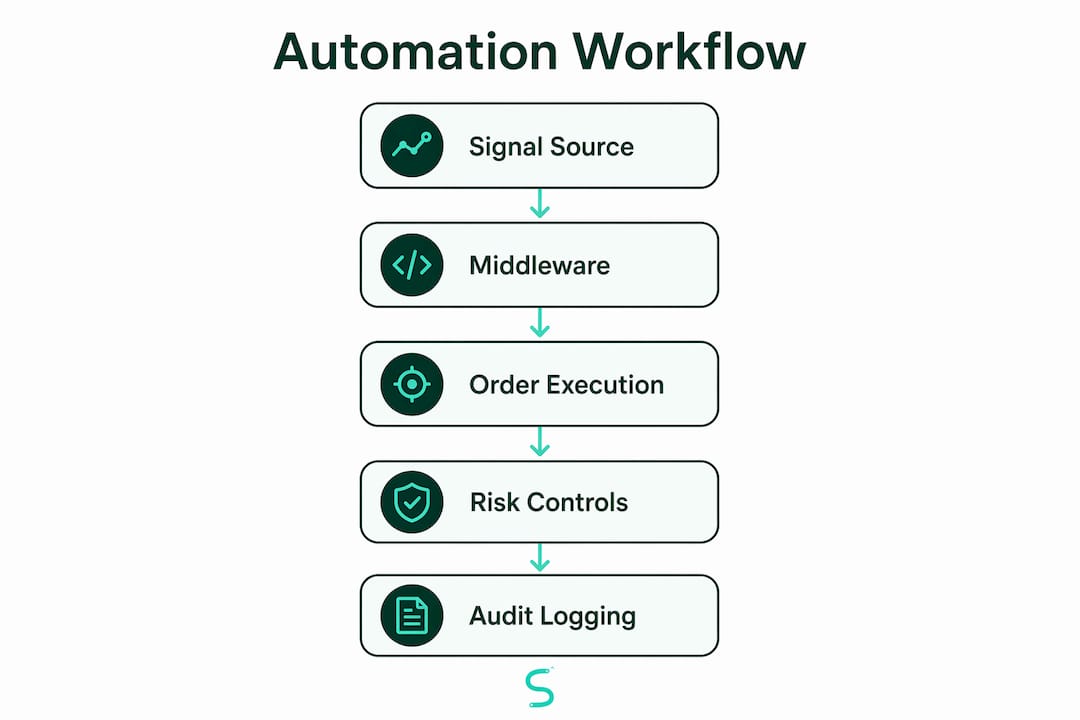
An automation workflow for traders is a connected system that takes a trade signal, applies risk controls, routes an order to a broker, and logs the result without manual input at each step. The gap between a profitable strategy and a profitable account often comes down to execution speed and consistency. Manual trading introduces hesitation, fat-finger errors, and missed entries. A well-built automated trading workflow removes all three. Tools like TradingView, n8n, and managed relay services now make this architecture accessible to individual traders, not just institutions. The core outcome is simple: your strategy fires, your risk gates check it, your broker fills it, and your journal records it.
What are the essential components of an automation workflow for traders?
Every trading automation workflow runs on three layers: signal source, middleware, and execution. Miss any layer and the whole pipeline breaks.
Signal source is where your trade idea originates. TradingView is the dominant platform here because it supports Pine Script indicators, real-time alerts, and native webhook output. TradingView requires a paid plan and two-factor authentication to unlock webhook URL fields. That means the free tier will not work for automation. Budget for at least the Essential plan before building anything else.
Middleware is the relay layer between your alert and your broker. You have three options:
- Managed relay services: Third-party tools that receive your webhook, translate the JSON payload, and forward a formatted order to your broker API. Managed relay services handle retry logic, broker API maintenance, and order translation, making them the best choice for multi-strategy or multi-broker setups.
- Self-hosted scripts: Python or Node.js scripts running on a VPS or cloud function. More control, more maintenance.
- Workflow builders like n8n: Visual, low-code tools that connect webhooks, APIs, and databases without writing full applications. Ideal for traders who want flexibility without deep programming knowledge.
Execution layer is your broker's API. Interactive Brokers, Alpaca, and similar brokers expose REST or FIX APIs that accept structured order objects. Your middleware must translate the incoming alert into the exact format your broker expects.
| Component | Tool examples | Best for |
|---|---|---|
| Signal source | TradingView, custom scripts | Alert generation |
| Middleware/relay | n8n, managed relay services | Alert translation |
| Broker execution | Interactive Brokers, Alpaca | Order placement |
| Trade logging | Google Sheets, databases | Audit and review |
Pro Tip: Choose your middleware based on three factors: broker coverage, latency tolerance, and your technical skill level. Managed relays win on reliability. Self-hosted scripts win on customization.

How to configure automated trading alerts and order execution
Getting the alert format right is the single most common failure point in trading automation. JSON formatted alert messages must include at minimum the ticker, side (buy or sell), and quantity. Most middleware expects a specific payload structure to map fields to broker order parameters. A malformed JSON string means no order gets placed.
Follow these steps to build a working trigger-to-order pipeline:
- Write your alert message in JSON. In TradingView, open the alert creation dialog and paste your JSON payload into the message field. Example:
{"ticker": "BTCUSDT", "side": "buy", "qty": 0.1}. Use TradingView's built-in variables like{{close}}and{{ticker}}to make the payload dynamic. - Paste your webhook URL. Enter your middleware endpoint in the "Webhook URL" field under the notification tab. This field only appears on paid TradingView plans with 2FA enabled.
- Test with a dry run. Fire the alert manually using TradingView's "Test" button before going live. Confirm your middleware receives the payload and logs it correctly. Do not skip this step.
- Choose bar close vs. intrabar timing. Alerts set to fire on bar close are more reliable for automation because the signal is confirmed. Intrabar alerts can fire multiple times on the same candle, creating duplicate orders.
- Verify order translation. Check that your middleware correctly maps the JSON fields to your broker's required order format. Log every incoming alert and every outgoing order for comparison.
- Run in paper trading mode first. Most brokers offer a sandbox or paper account. Route your live alerts to the paper account for at least one full week before switching to real capital.
Pro Tip: Set up a webhook alert guide as a reference while configuring your first pipeline. Seeing a working example cuts setup time significantly.
Common mistakes to avoid: using market orders without a size cap, forgetting to handle duplicate alert fires, and skipping error logging on the middleware side. Each of these has cost traders real money.
What are the best practices for risk management and kill switches?
Risk management in automated trading is not optional. Pre-trade risk controls and halt mechanisms are regulatory requirements for market access compliance, not features you add later. The SEC Market Access Rule requires broker-dealers to implement pre-trade risk checks before any order reaches an exchange. Retail traders using direct API access face the same architectural obligation.
A production-grade workflow separates risk gating from execution. The risk gate runs first and either approves or blocks the order. Only approved orders reach the broker API. This separation means a bug in your strategy logic cannot bypass your position size limits or daily loss caps.
Key risk controls to build into every workflow:
- Policy gates: Hard rules checked before every order. Examples: maximum position size, maximum daily loss, allowed trading hours, and symbol whitelist.
- Human-in-the-loop approval: For large orders or new strategies, route the order to a manual approval step with PENDING, APPROVE, and REJECT states before execution. This is especially useful during live deployment of an untested strategy.
- Circuit breakers: Automated trading systems benefit from real-time loss threshold monitoring that triggers automatic halts when drawdown exceeds a set limit. Your order management system should track P&L continuously and halt new orders when the threshold is breached.
Kill switches must be independent, deterministic, fail-safe, and idempotent. A well-designed kill switch sends a cancel-all command that is safe to send twice without creating duplicate cancellations. Manual re-enable is required after any kill event. Auto-resume is never acceptable.
The kill switch must live outside your strategy code. If your strategy logic has a bug, the kill switch still needs to fire. Treat it as a separate service with its own monitoring and alerting. Review your capital protection checklist regularly to confirm all controls remain active.
How to automate trade logging and build a clean audit trail
Automated trade logging is the part most traders skip and later regret. Without a reliable log, you cannot review strategy performance, diagnose errors, or satisfy compliance requirements. The goal is an append-only record that captures every order state change from signal to fill.
The most practical pattern for individual traders uses a scheduled workflow to pull trade data from your broker each day. An n8n workflow with Interactive Brokers FlexStatement XML demonstrates this well. The workflow runs daily, parses the XML report, normalizes the trade fields, and appends new rows to a Google Sheets journal. Duplicate entries are prevented by matching on a unique trade ID before writing.
Idempotency in trade logging means the same trade record can be processed multiple times without creating duplicate rows. Network retries and workflow restarts are common. Without idempotency checks, your journal fills with duplicates that corrupt your performance data.
Immutable append-only event logs capture every state change and can be replayed to reconstruct the full order flow. This matters for two reasons. First, it gives you a complete audit trail for compliance. Second, it lets you debug exactly what happened when a trade goes wrong.
Pro Tip: Log the raw alert payload alongside the broker fill. When a discrepancy appears between your signal and your execution, the raw log tells you exactly where the pipeline broke.
The benefits extend beyond compliance. A clean, normalized trade log is the foundation for performance analysis across strategies, timeframes, and instruments. Without it, you are guessing at what works.
Key Takeaways
A complete automation workflow for traders requires signal generation, risk-gated middleware, broker execution, and immutable logging working together as a single pipeline.
| Point | Details |
|---|---|
| TradingView setup requirements | A paid plan and 2FA are mandatory before webhook automation can be enabled. |
| JSON alert formatting | Every alert must include ticker, side, and quantity in a structured JSON payload for reliable middleware translation. |
| Risk gates before execution | Separate risk gating from strategy logic so position limits and loss caps cannot be bypassed by code bugs. |
| Kill switch independence | Build kill switches outside strategy code so they fire even when the strategy itself has a fault. |
| Idempotent trade logging | Use trade ID matching in your logging workflow to prevent duplicate records from retries or restarts. |
What I've learned from building trading automation workflows
The biggest mistake I see traders make is treating automation as a set-and-forget system. It is not. Every component in the pipeline, from the TradingView alert to the broker API response, can fail silently. Silent failures are the most dangerous kind because your strategy keeps firing signals while nothing actually executes.
My strongest recommendation is to deploy incrementally. Start with logging only. Connect your alerts, route them through middleware, and write every payload to a log file without placing any orders. Run that for a week. You will catch formatting errors, timing issues, and broker connectivity problems before they cost you money.
Latency is real but often overstated for swing and intraday traders. For scalpers on 1-minute charts, every millisecond matters. For traders on 15-minute charts, a 200-millisecond relay delay is irrelevant. Match your infrastructure investment to your actual timeframe.
The part I advocate for most strongly is auditability-first design. Building workflows with immutable logs from day one costs almost nothing extra. Retrofitting logging into an existing workflow after something goes wrong is painful and often incomplete. Build the log first, then build the execution layer around it.
Kill switches deserve more attention than most guides give them. I have seen traders lose significant capital because their automation kept firing orders during a broker outage. A properly designed kill switch, independent of strategy logic and tested monthly, is the single highest-value safety control you can add.
— Tran
Scalping-algo tools that plug directly into your workflow
Scalping-algo builds TradingView indicators in Pine Script v6 that generate real-time, non-repainting buy and sell signals on timeframes from 1 minute to 15 minutes. These signals are designed to feed directly into automation pipelines via native webhook alerts.
The Smart Scalping Signals indicator produces clean JSON-compatible alert outputs that work with the middleware setups covered in this guide. The Algo Master suite combines three indicators into a single system built for traders who want confluence-based signals without manual chart reading. All scripts are open-source and include Discord webhook integration out of the box. Visit Scalping-algo to see the full indicator library and connect with the live trading community.
FAQ
What is an automation workflow for traders?
An automation workflow for traders is a pipeline that connects a trade signal to order execution, risk controls, and logging without requiring manual input at each step. It typically runs from a signal source like TradingView through middleware to a broker API.
Does TradingView support webhook automation on free plans?
No. TradingView requires a paid plan and two-factor authentication to enable webhook URL fields in the alert notification settings.
What is the best tool for automated trade logging?
n8n is a practical choice for individual traders. It connects to broker report APIs, parses trade data, and writes normalized records to Google Sheets with idempotency checks to prevent duplicate entries.
Why do kill switches need to be independent from strategy logic?
Kill switches must be independent because a bug in strategy code can prevent the strategy from halting itself. A separate kill service fires regardless of what the strategy is doing.
How do I test an automated trading workflow before going live?
Run your full pipeline in paper trading mode for at least one week. Fire alerts manually, confirm middleware receives and translates them correctly, and verify that broker orders appear in your paper account before switching to live capital.