

Dashboard automation turns your TradingView indicators into an execution-first control surface. Instead of watching charts and manually routing signals to Discord, your broker, or a spreadsheet, an automated dashboard does the routing for you. The result: faster reaction times, fewer missed setups, and consistent trade journaling without the manual overhead.
The immediate wins for scalpers are concrete:
- Faster reaction: alerts fire into your execution channel the moment a signal triggers, cutting the gap between insight and action
- Less cognitive switching: no more toggling between TradingView, Discord, and your broker terminal to piece together a setup
- Consistent journaling: every alert, entry, and exit writes to a log automatically, ready for backtesting
- Lower overhead: automating reporting and dashboards reclaims 8–12 hours per week per trader who previously built reports manually, and modern systems can cover roughly 99% of the reporting pipeline, leaving only the final judgment call to you
Table of Contents
- What does dashboard automation actually do for short-term scalping?
- Practical automation workflows you can copy right now
- How to integrate TradingView with Discord and broker APIs
- Risk controls and U.S.-specific constraints you need to plan for
- How automation improves your decision-making as a scalper
- Checklist: build an execution-first scalping dashboard
- Key Takeaways
- Why execution-first dashboards are the only kind worth building
- Scalping-algo gives you the signal layer and the routing layer together
- Useful sources and further reading
What does dashboard automation actually do for short-term scalping?
The standard definition of dashboard automation covers structured data pipelines that keep KPIs refreshed in real time. For scalpers, the relevant shift is more specific: dashboards are moving from passive displays to an execution-first model where the dashboard coordinates context and triggers downstream workflows.
That means four concrete capabilities:
Signal aggregation. Collect TradingView indicator outputs, volume filters, and multi-timeframe confluence into one stream. You see one qualified setup, not twenty raw signals.
Alert routing. Transform a Pine Script v6 alert into a structured JSON webhook payload and push it to Discord, a webhook receiver, or a broker API like Alpaca or Coinbase Pro.
Exception surfacing. Surface only high-confluence setups — divergence plus order block plus volatility gate — rather than every signal the indicator fires. This prevents analysis paralysis.
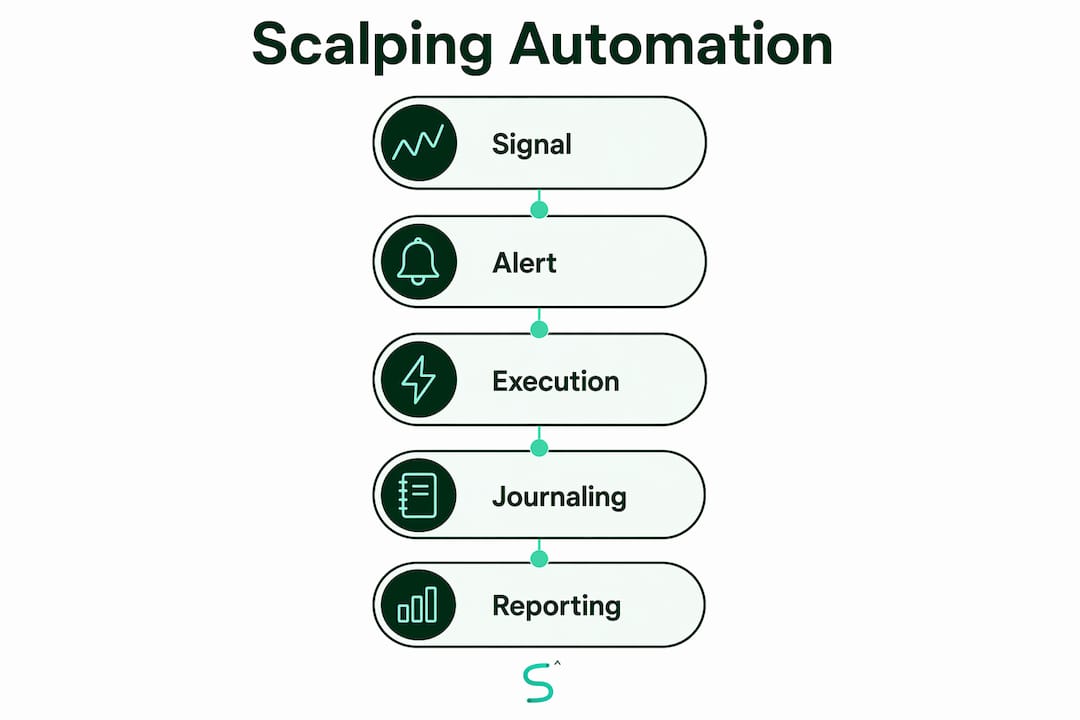
Automated journaling. Each alert and execution writes a timestamped record with entry price, TP/SL, and slippage. The log feeds directly into backtesting without manual data entry.
| Metric | Before automation | After automation |
|---|---|---|
| Weekly reporting overhead | 8–12 hours | Near zero |
| Reporting pipeline coverage | Manual | ~99% automated |
| Time-to-execution | Seconds to minutes | Sub-second routing |
| Missed setups from manual lag | Common | Rare with kill-switch monitoring |
Practical automation workflows you can copy right now
Three workflows cover most scalping use cases. Pick the one that matches your risk tolerance and testing stage.
Workflow 1 — Alert to Discord briefing. TradingView fires an alert. A webhook receiver parses the JSON payload and posts a formatted embed to your Discord channel: entry price, TP, SL, confluence score, and risk percentage. You read it and manually confirm the trade. This is the lowest-risk starting point and the easiest to test. For a deeper look at building webhook payloads from TradingView alerts, the Scalping-algo guide covers the full routing path.

Workflow 2 — Alert to prefilled order (manual confirm). The webhook receiver creates a prefilled order ticket in your broker UI. You review the parameters and hit submit. Alpaca's paper trading API and Coinbase Pro's sandbox both support this pattern. The human stays in the loop; the dashboard eliminates the data-entry step.
Workflow 3 — Alert to execution bot (semi-autonomous). Strict rules, tested setups only. The dashboard routes the alert directly to a broker API for execution. This requires a kill-switch, rate-limit handling, and a dry-run log before going live. Reserve this for setups with extensive backtest history.
Reporting workflow. Every alert and execution writes to a backtest-ready log. Review it weekly to tune confluence thresholds and catch slippage patterns before they compound.
Pro Tip: Always include a confluence score, a unique Pine Script signal ID, and a UTC timestamp in your JSON payload. This lets your dashboard dedupe repeated alerts and prevents double-execution on reconnects.
How to integrate TradingView with Discord and broker APIs
The integration sequence is straightforward when you follow it in order.
- Define the signal. Lock in your Pine Script v6 alert condition. Non-repainting signals only. If the signal repaints on historical bars, the entire downstream automation is unreliable.
- Build the alert message. Use TradingView's native webhook alert support. Format the message as JSON: include
signal_id,symbol,entry,tp,sl,confluence_score, andtimestamp_utc. - Set up a webhook receiver. A lightweight server (or a no-code tool) receives the POST, validates the schema, and routes the payload. Add an idempotency key so duplicate alerts from reconnects don't fire twice.
- Parse into Discord or broker API. For Discord, format as an embed. For Alpaca or Coinbase Pro, map the payload fields to the broker's order schema.
- Apply execution rules. The dashboard checks the confluence score against your threshold before escalating to execution. Below threshold, it logs and discards.
Security and rate limits are not optional. Keep webhook secrets in environment variables, never in Pine Script code. Use encrypted tunnels for broker API calls. Respect broker rate limits — Alpaca's paper API throttles at a defined request-per-minute ceiling, and hitting it mid-session causes missed fills. Build retry/backoff logic before you go live.
Testing is where a significant proportion of poorly-governed no-code implementations fail. Run every new automation through a sandbox broker account first. Use dry-run mode where the dashboard records intended actions without executing them. Replay historical alerts to check latency and stability before touching real capital.
Pro Tip: Use idempotency keys in every payload. A TradingView alert can fire twice on a bar close during a reconnect. Without deduplication, your bot places two orders.
Risk controls and U.S.-specific constraints you need to plan for
Automation amplifies both good setups and bad ones. These controls are non-negotiable before live execution.
- PDT rule: U.S. accounts under $25,000 are limited to three day trades in a rolling five-business-day window. Automation that fires frequently can exhaust your PDT allowance in hours. Track day-trade counts in your dashboard and add a hard stop when the limit approaches.
- Slippage buffers: Measure end-to-end latency from alert fire to fill confirmation. Build a slippage buffer into every prefilled order template. On 1m–5m timeframes, a 200ms latency difference can mean a materially worse fill.
- API throttling: Design retry/backoff and request queuing so your dashboard never floods the broker API. A burst of signals during a volatile open can trigger rate-limit errors at the worst possible moment.
- Kill-switch: Implement a top-level emergency stop that disables automated execution on anomalous fills, connection loss, or drawdown threshold breach. This is the single most important safety control in any automated scalping setup.
- Version control and audit logs: Keep every Pine Script alert version in a Git repository. Log every automation rule change with a timestamp. When a drawdown happens, you need to know exactly which rule version was live.
Pro Tip: Build your kill-switch before you build anything else. A dashboard that can't be stopped instantly is a liability, not an asset.
For a full automated trading checklist covering safety controls and testing steps, the Scalping-algo resource covers retail-specific requirements in detail.
How automation improves your decision-making as a scalper
The core problem with manual scalping is cognitive switching: moving between TradingView, Discord, a spreadsheet, and a broker terminal to piece together a single trade decision. Each context switch costs time and introduces error. Automation eliminates the switching by concentrating decision context into one channel.
The effect is measurable. Track three metrics before and after you deploy automation: time-to-execution (from signal fire to order submission), missed-setup rate (setups that fired while you were in another window), and trade outcome delta (win rate and average slippage). Most traders find the missed-setup rate drops sharply within the first week.
Although dashboard automation is becoming more common, 78% of organizations with automated dashboards still rely on manual interpretation for key decisions. That last-mile gap is exactly what execution-first automation closes. The dashboard doesn't just display the signal; it routes it to the channel where you act.
Checklist: build an execution-first scalping dashboard
Follow this order. Each step must be stable before you move to the next.
- Stable signal definition. Non-repainting Pine Script v6 signals with a confluence score. No confluence score, no automation.
- Reliable alert payload. JSON schema with idempotency key, confluence score, entry/TP/SL, risk percentage, and UTC timestamp.
- Receiver and parsing. Webhook endpoint with schema validation and dedupe logic. Test with simulated payloads before connecting TradingView.
- Safety layer. Sandbox broker account, dry-run mode, manual-confirm path for the first 20 trades, and automatic journaling from day one.
- Monitoring and maintenance. Latency dashboard, error alerts for failed webhook deliveries, and a weekly backtest replay against the live log.
Pro Tip: Run at least two weeks of dry-run before enabling live execution. Log every intended action. Review the log for duplicate signals, latency spikes, and missed confluence checks.
For more on structuring the full automation workflow for traders, including ownership and governance, the Scalping-algo blog covers the build sequence in depth.
Key Takeaways
Execution-first dashboard automation for scalpers works when the dashboard routes high-confluence signals directly into your execution channel, eliminating manual data-entry and cognitive switching between tools.
| Point | Details |
|---|---|
| Time savings are real | Automating reporting and alert routing reclaims 8–12 hours per week previously spent on manual tasks. |
| Execution-first beats display-only | Dashboards that trigger webhooks and order workflows close the gap that leaves 78% of organizations with automated dashboards still relying on manual interpretation for key decisions. |
| Safety before speed | Build the kill-switch, dry-run mode, and PDT tracking before enabling any live execution. |
| JSON payload discipline | Include idempotency keys, confluence scores, and UTC timestamps in every alert payload to prevent duplicate orders. |
| Scalping-algo starting point | Scalping-algo's Command Center, Pine Script v6 indicators, and native Discord webhook alerts provide the signal and routing layer this checklist requires. |
Why execution-first dashboards are the only kind worth building
Most traders set up a dashboard and stop there. They get a cleaner view of their signals, maybe a Discord notification, and call it automation. That's not automation. That's a prettier version of the same manual workflow.
The traders who actually recover time and improve execution are the ones who treat the dashboard as a coordinator, not a display. The signal fires, the payload routes, the order is prefilled or submitted, and the journal entry is written. The trader's job is to confirm or kill, not to copy-paste data between windows.
The agentic dashboard model makes this explicit: reliable automation needs a semantic model for your KPIs, a programmatic surface for execution, a handoff protocol between signal and action, and observability so you can audit every step. Failures in automated setups are almost always architectural, not signal-quality problems. The signal was fine. The routing broke, or the deduplication was missing, or there was no kill-switch when the fill came back wrong.
Start with reporting automation. Validate the explanation layer. Then add guarded execution paths one at a time. That progression is slower than going straight to a fully automated bot, but it's the only approach with a real audit trail when something goes wrong.
Scalping-algo gives you the signal layer and the routing layer together
Most traders have to stitch together a signal source, a webhook router, a Discord integration, and a backtesting log from separate tools. Scalping-algo builds all of it into one platform.
The premium indicator suite runs on Pine Script v6 with non-repainting real-time signals across crypto, forex, indices, and futures on 1m–15m timeframes. Native webhook alerts push structured payloads directly to Discord or any webhook receiver without a third-party bridge. The Command Center dashboard handles alert management, journaling, and backtesting in one place, so your dry-run log and your live log live in the same interface.
For traders who want a preconfigured starting point, the Algo Master suite includes a three-indicator system with preset confluence thresholds and Discord alert templates. The Discord mentorship community runs live sessions where you can validate your automation setup before committing real capital. Start with the sandbox backtest feature, confirm your webhook routing works end-to-end, and then scale up.
Useful sources and further reading
Research and reference sources used in this article:
- Automate Reporting and Dashboards with AI — Taskade Blog: source for the 8–12 hours/week and ~99% automation coverage figures
- Dashboard Automation: A Guide to Real-Time BI & AI Agents — Cyndra Blog: execution-first model, 78% manual interpretation stat, and 65% failure rate for ungoverned implementations
- How to Automate Business Reports With an AI Agent — Towards AI: cognitive switching and execution-channel concentration
- Agentic Dashboards with MCP and A2A — Fawad Hussain Syed: architectural requirements for reliable agentic dashboards
- Dashboard Automation Glossary — Hyperbots: foundational definition of dashboard automation pipelines
Scalping-algo internal guides:
- Webhook Trading Alerts Explained for Smarter Automation: step-by-step webhook payload setup
- Automation Workflow for Traders: Build It Right: governance and ownership structure
- Automated Trading Checklist for Retail Traders: safety and testing checklist
What to run first in a test environment: start with Workflow 1 (alert to Discord only), measure latency from alert fire to Discord post, and confirm deduplication is working before adding any order execution. Key monitoring metrics: webhook delivery success rate, alert-to-Discord latency (target under 500ms), duplicate signal rate, and kill-switch response time. For an external perspective on why most AI trading bots fail before reaching live execution, that resource covers the common architectural and governance gaps in plain terms.